
If invoices or payments aren't showing up in QuickBooks, work through these checks in order. Most of the time the answer is on one page, and nothing is lost — Run a Call holds records back safely until the problem is fixed.
Who can do this: the account owner (QuickBooks settings are owner-only).
Open the QuickBooks page
Go to Settings → Integrations and click Manage on the QuickBooks Online card.
Check the connection card
| You see | What to do |
|---|---|
| Token expired with a Reconnect button | QuickBooks signed Run a Call out. Click Reconnect and sign in to QuickBooks. Syncing resumes where it stopped. |
| A banner: Hourly sync is paused — review, then turn it on | Sync was paused after a QuickBooks history import so you could check it first. Click Looks good — turn on hourly sync. |
| Last sync is recent and Auto sync: Every hour | The connection is fine. Go to step 3. |
Sync runs every hour. A record you created a few minutes ago may just be waiting for the next run — its status shows pending.
Look at records that need attention
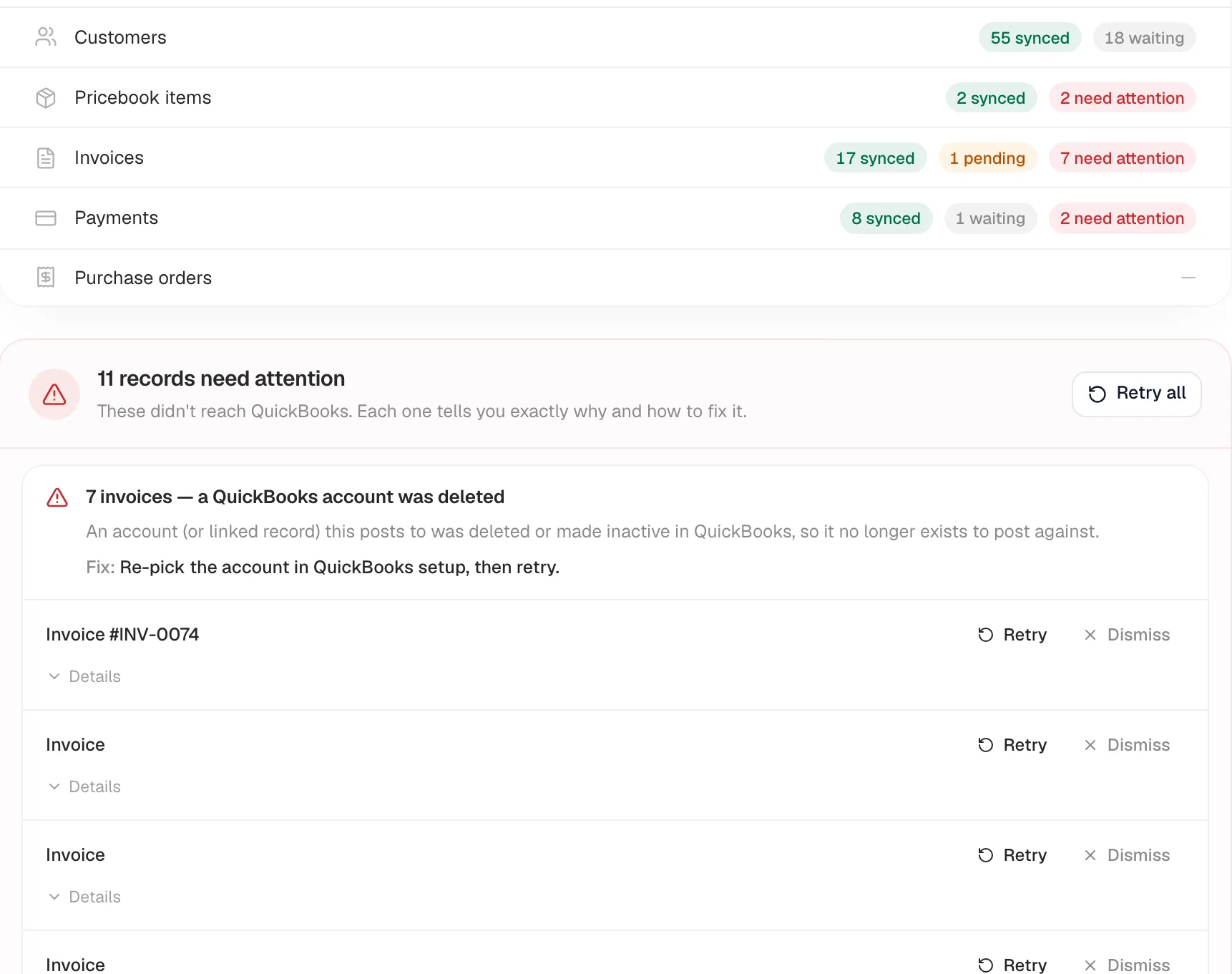
Under Your books, reconciled, each record type shows chips like synced, pending, waiting, and need attention. If anything is held back, a list appears — records need attention or records on hold — grouped by cause, each with a Fix.
- need attention — something needs changing. Follow the Fix, then click Retry on the record (or Retry all).
- waiting / on hold — held on purpose, for example a payment waiting for its invoice to sync first. These clear on their own once the related record syncs.
What each message means: Resolving common QuickBooks errors.
Check your account and tax mapping
Many held invoices come down to setup. Open Sync settings & account mapping and confirm:
- An Income Account is picked, and it still exists and is active in QuickBooks.
- If you charge sales tax, a Tax Code is picked — and, if you use more than one rate, each rate is mapped under Tax codes by jurisdiction.
Click Save Settings. Saving a tax code or class re-queues invoices that were waiting on it.
Common situations
| Situation | Likely cause | Fix |
|---|---|---|
| "Nothing has synced since yesterday" | The QuickBooks connection expired | Reconnect |
| "Only taxed invoices are missing" | No tax code, or a tax rate isn't mapped | Map it under Sync settings & account mapping, then save |
| "A customer never shows up in QuickBooks" | A customer from your old software has no QuickBooks match | Create or rename the customer in QuickBooks to match, then open and save the customer in Run a Call |
| "The Sync Log says Skipped" | Invoices and payments migrated from your old system — QuickBooks already has them | Nothing to do |
| "An old invoice was refused" | Its date is before your QuickBooks closing date | Open Details on the record and check with your accountant |
Don't disconnect and reconnect to "reset" syncing. Disconnecting clears the links between your records and their QuickBooks copies, and a fresh connection can post duplicates into your books. Use Reconnect when the token expired; for anything else, contact support.
Still stuck?
Click Details on the record, copy the text, and send it to us from Settings → Support. See Getting help from Run a Call support.