
When a record can't reach QuickBooks, Run a Call holds it back safely and tells you why — nothing is lost, and nothing is posted twice. This article explains every message you can see and what to do about it.
Where to look
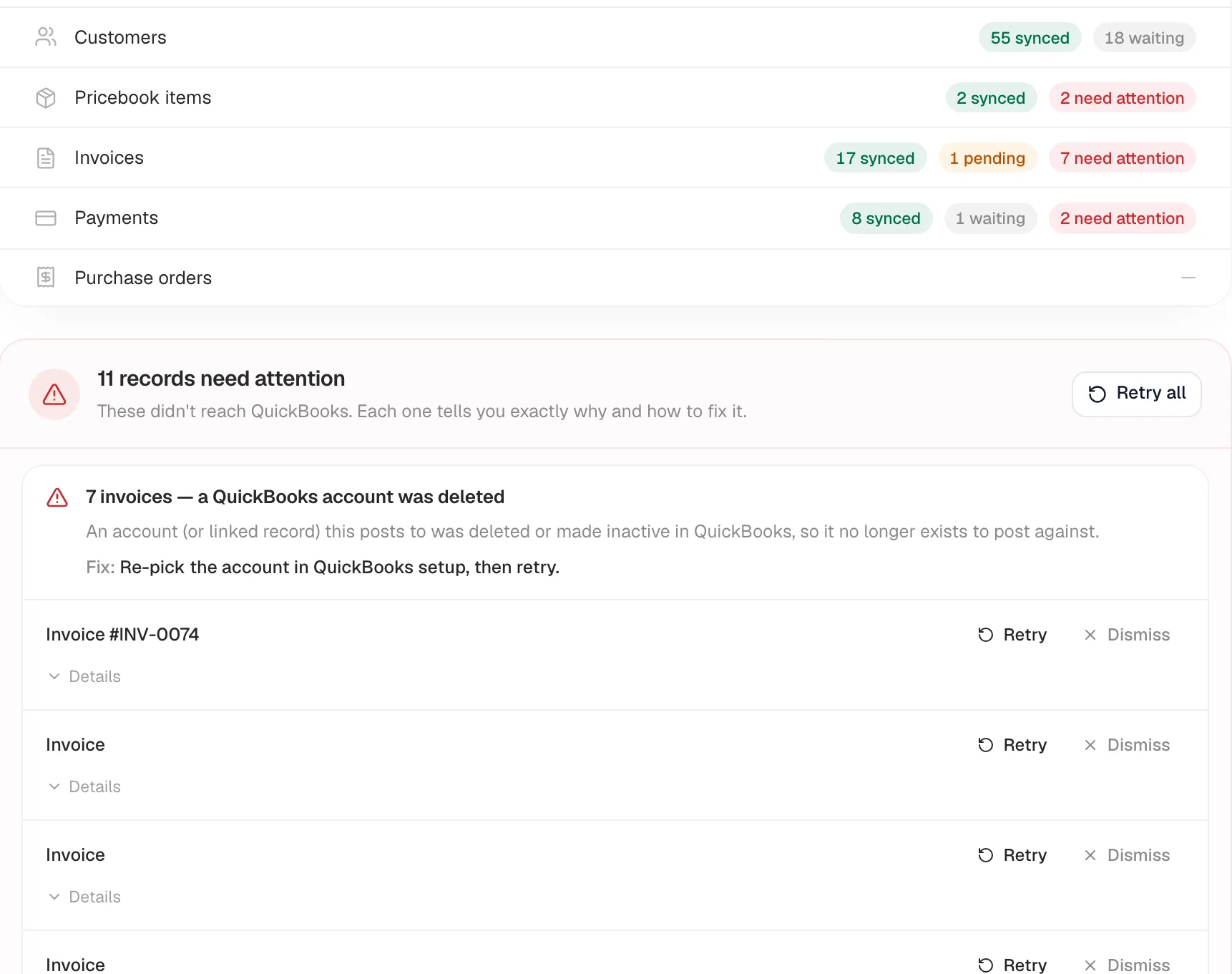
Go to Settings → Integrations → QuickBooks Online → Manage. Held-back records are listed under "N records need attention" (something needs fixing) or "N records on hold" (held on purpose, nothing broken). Records are grouped by cause, such as "7 invoices — a QuickBooks account was deleted", and each group shows an explanation and a Fix.
You'll also spot problems on the records themselves: a customer profile or invoice shows a red QuickBooks sync issue (or QuickBooks needs attention) badge. Hover it to read the reason; click it to jump to the QuickBooks page.
How to clear a record
- Read the Fix for the group and make the change (in QuickBooks, in your QuickBooks settings, or on the record in Run a Call).
- Click Retry on the record, or Retry all at the top. It goes over on the next sync.
- Some fixes say "edit this record to retry" — for those, open the customer or item in Run a Call and save it; that re-checks the match.
Dismiss only hides a record from the list in your browser. It doesn't fix or delete anything, and the record comes back if it fails again.
Messages that need a fix
| Message | What it means | Fix |
|---|---|---|
| a QuickBooks account was deleted | An account (or another linked record) this posts to was deleted or made inactive in QuickBooks. QuickBooks' "Invalid Reference Id" errors land here too. | Re-pick the account under Sync settings & account mapping (Income, COGS, Tax Code), save, then retry. |
| a QuickBooks class was deleted or renamed | A class you mapped no longer exists in QuickBooks. | Re-pick the class under Class tracking and save — held invoices are retried automatically. |
| no income account is set | Setup wasn't finished. | Pick an Income Account, then retry. |
| no sales-tax code is mapped | The invoice charges tax but no QuickBooks tax code is chosen (or its tax rate isn't mapped). Syncing without one would understate tax in your books. | Choose a Tax Code (or map the rate under Tax codes by jurisdiction) and save — held invoices retry automatically. |
| A message starting "QuickBooks Automated Sales Tax calculates tax from the customer's billing address…" | Your QuickBooks company uses Automated Sales Tax, you charge more than one tax rate, and Run a Call couldn't safely send the invoice with a tax check. | Retry. If it stays held back, contact support — see Mapping tax rates. |
| QuickBooks computed a different total | Automated Sales Tax calculated a different total than the customer was billed, so the QuickBooks copy was removed and the invoice held back. | Check the sales-tax rate for the job's service address against QuickBooks, then retry. |
| the name is already used elsewhere in QuickBooks | QuickBooks keeps names unique across customers, vendors and employees, and something else already uses this name. | Rename the record here or in QuickBooks so the name is unique, then retry. |
| the record has no usable name | QuickBooks needs a name to file it under. | Add a name to the record in Run a Call and save. |
| the QuickBooks connection expired | QuickBooks signed Run a Call out. | Click Reconnect at the top of the page. |
| QuickBooks rejected the record | QuickBooks declined the data. | Open Details for QuickBooks' exact reason, fix the record, then retry. |
| sync didn't complete | No specific reason was recorded. | Retry. If it keeps failing, contact support with the Details text. |
Messages that are held on purpose
| Message | What it means | Fix |
|---|---|---|
| waiting on a related record to sync first | A payment or invoice depends on a customer or invoice that isn't in QuickBooks yet. | Clear the related record's issue. This one retries by itself afterwards. |
| came from your old system with no QuickBooks match | A customer moved over from your previous software has no matching customer in QuickBooks. To protect your books, these are never created automatically in bulk. | Create or rename the customer in QuickBooks to match, then open and save the customer in Run a Call to re-match. |
| its parent was migrated and lives in QuickBooks already | A payment on an invoice from your old system — QuickBooks already has the original. | Record or reconcile it in QuickBooks. Nothing needs to be sent. |
| two records point at the same QuickBooks entry | The QuickBooks record that matched is already linked to a different record here (often a duplicate customer, or two items whose names differ only by capital letters). | Merge or rename the duplicate, then edit the record to retry. |
| held by the duplicate-flood safety limit | A large batch of brand-new records tripped the limit that stops an established book from being flooded with duplicates. | Confirm the names don't already exist in QuickBooks, then retry. |
| QuickBooks was busy / QuickBooks was temporarily unavailable | A temporary hiccup on QuickBooks' side. | Nothing — it retries on its own. |
Other things you might notice
A closed books period. If QuickBooks refuses a record because its date falls before your closing date, open Details on the record to read QuickBooks' own explanation. Ask your accountant whether to lift the closing date temporarily or record it by hand in QuickBooks.
"Skipped" in the Sync Log. Not an error. Invoices and payments that came over from your old system are intentionally skipped, because QuickBooks already has them.
Still stuck?
Copy the Details text and send it to us from Settings → Support. The sync log tells us exactly what QuickBooks answered.