
When someone finds you on Google, an ad or social media and then picks up the phone, you usually can't tell which one brought them. The website number pool fixes that: on your website only, each visitor sees a different phone number from a small pool you own, and a call to that number arrives already knowing which search or ad the caller came from.
Your real number stays everywhere else: trucks, business cards, your Google profile. Nothing changes for the visitor except the digits on the page, and every pool number rings your team exactly like your main line.
The pool starts off. Nothing changes on your site until you turn it on.
Before you start
- You need to be an owner or admin.
- Your account needs the Voice add-on. Pool numbers are phone lines, so without Voice the card stays visible but locked, with an Open Billing button.
- The website tracking code has to be on your site. The pool rides on that same line of code; there is nothing extra to paste.
How it works
- A visitor opens any page of your website.
- The tracking code asks Run a Call for a number. Run a Call hands out one free pool number and remembers which visit holds it.
- The number printed on your page is rewritten, digit for digit, everywhere it appears: in text, in the header and footer, in buttons, and inside tap-to-call links. The format you use is kept, so (813) 555-0100 becomes (813) 555-0187, and 813-555-0100 becomes 813-555-0187.
- The visitor keeps that number for the whole visit, about 30 minutes, renewed while the tab stays open. Then it's freed for the next visitor.
- When someone calls a pool number, Run a Call looks up which visit held it at that moment. The call lands with that visit's source, campaign and landing page, and the pop-up reads Came from: Google Ads · /ac-repair.
If every pool number is in use, the page simply keeps your real number. Nothing breaks; the card counts the miss so you know to add numbers.
Set it up
Go to Settings → Online Booking. The Website number pool card sits under Website tracking.
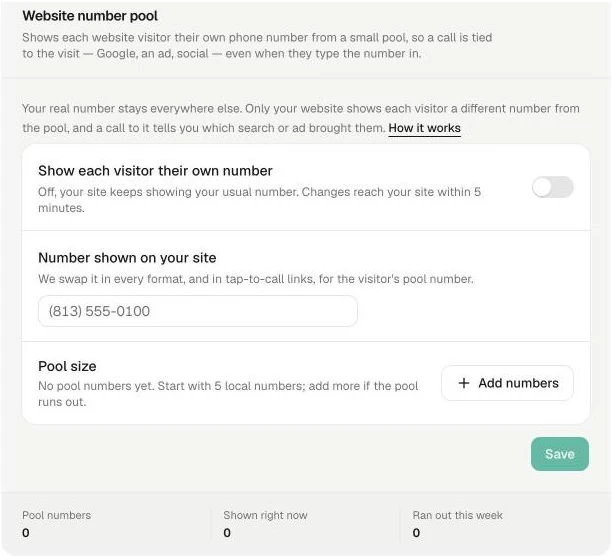
- Under Number shown on your site, type the phone number currently printed on your website. This is the number that gets swapped. Any format works.
- Next to Pool size, click Add numbers and buy local numbers. Each is a normal phone line at the usual per-number price. Start with 5 and add more if the pool runs out.
- Turn on Show each visitor their own number and click Save. Your site picks up the change within 5 minutes.
Pool numbers also appear under Settings → Phone → Numbers, tagged as pool numbers, next to your regular lines.
How many numbers do you need?
One per person on your site at the same moment. The footer of the card tells you:
| Count | Meaning |
|---|---|
| Pool numbers | How many lines are in the pool. |
| Shown right now | How many visitors currently hold a number. |
| Ran out this week | How many visits found every number taken and saw your real number instead. If this climbs, add a couple more numbers. |
Most small shops are fine with 5. A site that runs ads to a busy landing page may want 8 to 10.
Where you see the result
- Incoming call pop-up and the dispatch caller panel: a Came from line with the source, campaign and landing page.
- The call's record: source, medium and campaign are saved on the call, so the match survives after the pop-up closes.
- Reports → Marketing Attribution: calls are credited to their source and campaign. See Marketing Attribution report.
A returning visitor who calls again within 7 days keeps the credit of the visit that first brought them, so a customer who found you on Google and came back by typing your address still counts as Google.
Good to know
- Turning the pool off puts your real number back on every page within 5 minutes. Calls already matched keep their source.
- No visitor data is stored on your site. The tracking code only asks for a number; the pool holds which number was shown to which visit, for a few hours.
- Staff can see the card but not change it. Owners and admins manage the pool.
- The pool needs the tracking code on every page. A page without it shows your real number.