
The trigger is the event that starts a custom automation. You pick it by clicking the trigger card in the builder; the list is grouped the same way as below. You can change it later with Change on the trigger card.
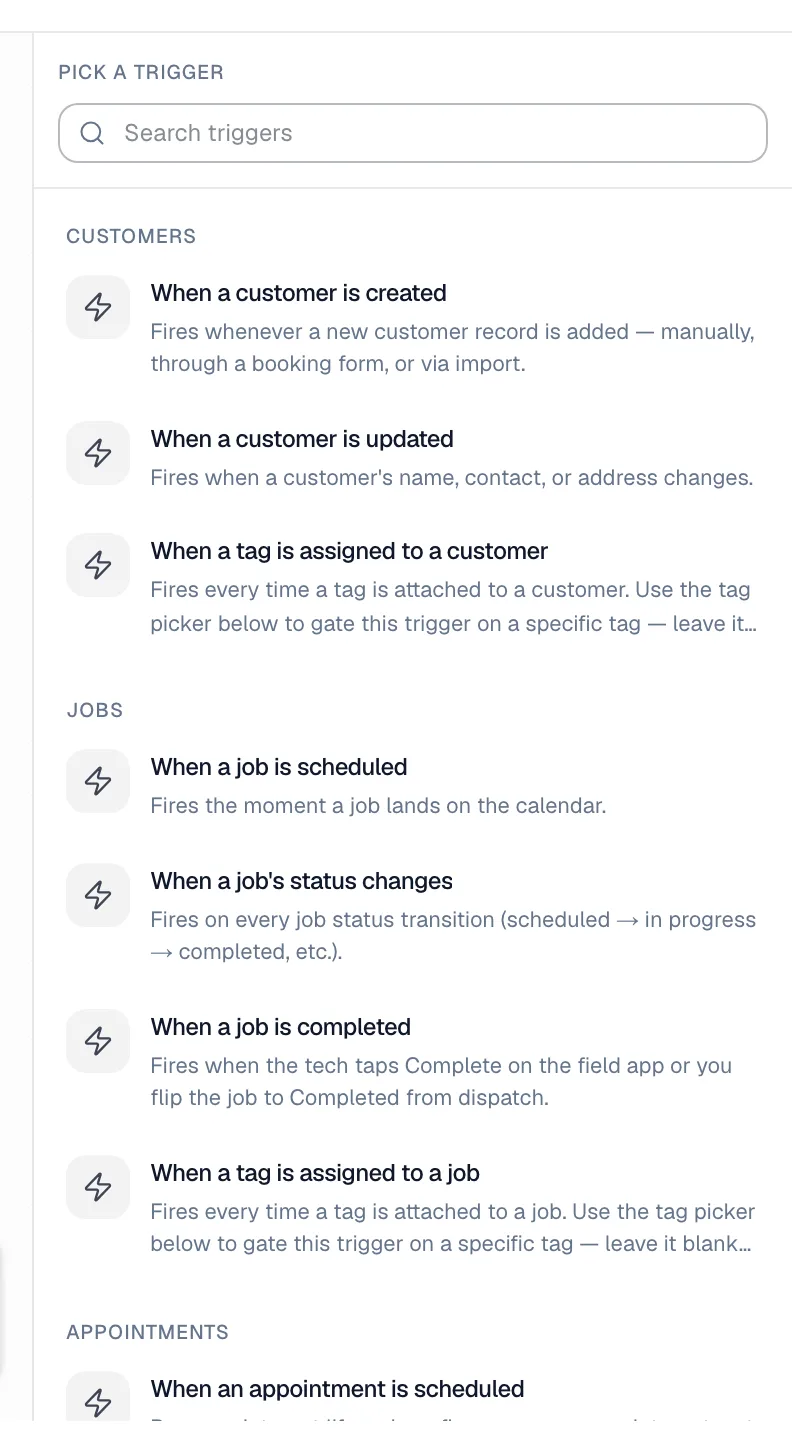
Customers
| Trigger | Fires when… |
|---|---|
| When a customer is created | A new customer record is added: by hand, from the field app, by the AI receptionist, or by an import. An online booking doesn't fire this — use When an online booking comes in instead. |
| When a customer is updated | A customer's name, contact details or address changes. |
| When a tag is assigned to a customer | A tag is added to a customer. You must pick which tag under Trigger only when this tag is added. |
Jobs
| Trigger | Fires when… |
|---|---|
| When a job is scheduled | A job lands on the schedule. |
| When a job's status changes | The job moves to any other status. To react to one status only, add a Filter on job.status right after the trigger. |
| When a job is completed | The tech completes the job in the mobile app, or the office sets it to completed. |
| When a tag is assigned to a job | A tag is added to a job. You must pick the tag. |
Appointments
A job can have several appointments (for example a two-day install). These fire once per appointment.
| Trigger | Fires when… |
|---|---|
| When an appointment is scheduled | Each appointment is put on the schedule. |
| When an appointment is completed | Each appointment is finished. On a multi-day job, the last one also fires When a job is completed. |
Estimates, invoices and payments
| Trigger | Fires when… |
|---|---|
| When an estimate is sent | You send an estimate from the estimate page. |
| When an estimate is approved | The customer taps approve on their estimate link. |
| When an invoice is issued | An invoice is finalized. |
| When an invoice is paid | The invoice is paid in full, whether online, recorded by your team, or synced from QuickBooks. |
| When a payment is received | Any payment comes in. Fires once per payment, so a partial payment fires it too. |
| When a deposit is paid | An invoice from an estimate's payment schedule is paid in full — the deposit or any later milestone. Partial payments don't fire it. Filter on job.type to limit it to one kind of job, or on milestone.position equals 1 for the deposit only. See Creating install tasks when a deposit is paid. |
Memberships
| Trigger | Fires when… |
|---|---|
| When a membership is created | A customer is enrolled in a membership plan. |
| When a membership renews | A renewal invoice is paid, by autopay or marked paid. |
Calls
| Trigger | Fires when… |
|---|---|
| When an AI call ends | The AI receptionist finishes a real conversation. Spam and robocalls never fire it. |
| When a call is missed | A call to your business line ends without anyone answering: not your team, not the AI receptionist, and not an outside number your call flow forwarded to. |
How "When a call is missed" works
- It fires about two minutes after the call ends, fast enough to reach the caller while they still have their phone in hand.
- It doesn't fire for calls between your own team, for outgoing calls, or when the same caller rang back within those two minutes and got through.
- It fires whether or not the caller left a voicemail. To skip callers who left one, add a Filter on
call.voicemail_leftis false. A caller who is still recording a voicemail at the two-minute mark counts as not having left one. - It gives you the caller's number, the number they dialed, whether they left a voicemail, the caller's name when the number matches a customer, and that customer's details.
Text back a missed call
- Automations → New automation.
- Pick the trigger When a call is missed.
- Add a step → Send SMS.
- Set Send to to The caller (missed-call trigger).
- Write the message, for example: Sorry we missed your call at {{org.name}}. Reply here and we'll get right back to you.
- Save, then Activate.
What happens:
- The text goes out from your business texting number, so the caller's reply lands in Conversations like any other customer text.
- A caller who isn't a customer yet is added as a new lead with their phone number, so the conversation has somewhere to live.
- Callers who hid their caller ID can't be texted; the run's text step says so.
- Normal texting rules apply: texting must be set up and approved, callers who replied STOP are skipped, and a customer gets at most one automated text every 25 minutes.
Online booking
| Trigger | Fires when… |
|---|---|
| When an online booking comes in | A customer submits your booking page, a booking form embedded on your website, or Reserve with Google. It fires for requests waiting in the Bookings inbox and for bookings that auto-confirmed into a job. Only online bookings fire it; jobs your office or the AI receptionist book don't. |
| When an online booking is confirmed | An online booking request becomes a scheduled job: you confirm it from the Bookings inbox, or it auto-confirmed because Book instantly is on. |
Both give you the service, how soon they need it (booking.urgency), the day and arrival window they picked (booking.requested_date and booking.requested_window, empty when they said they're flexible), the address, what they wrote about the problem, where it came from (booking.source: website, embed or google), a link to handle it (booking.link), and the customer's details.
Get texted and emailed when an online booking comes in
- Automations → New automation.
- Pick the trigger When an online booking comes in.
- Add a step → Send SMS. Set Send to to Custom phone and type your cell number. Write the message, for example: New online booking: {{booking.customer_name}}, {{booking.service_type}} ({{booking.urgency}}) on {{booking.requested_date}} {{booking.requested_window}}. Call {{booking.customer_phone}}. {{booking.link}}
- Add another step → Send email. Set Send to to Org owner (or Custom email for a shared inbox), give it a subject, and use the same variables in the body.
- Save, then Activate.
Add as many Send SMS steps as people who should be texted. Texting the office needs business texting set up, like any other text step.
You don't need a filter to limit this to online bookings: the trigger never fires for jobs booked by hand. To react to one source only, add a Filter on booking.source.
Separately from automations, every new online booking also pushes a notification to the Run a Call app on each office member's phone, next to the bell notification on the desktop.
External
| Trigger | Fires when… |
|---|---|
| When an inbound webhook fires | Another app sends data to this automation's own web address. See Triggering automations from an inbound webhook. |
Choosing between similar triggers
- Use When a job is completed rather than When a job's status changes plus a filter; it's simpler.
- Use When a payment is received to thank a customer for every payment, and When an invoice is paid for "paid in full" follow-ups.
- Use When a deposit is paid for work that should start once a payment-schedule deposit is in, such as ordering equipment for an install.
- Use the Appointments triggers when each visit of a multi-day job should get its own message.
What isn't a trigger
- A customer opening an email or tapping a link in a text.
- A specific date or a repeating schedule (such as every October 1).
- A voicemail on its own. Use When a call is missed with a filter on
call.voicemail_left. - A tech clocking in or out.
- A job booked by your office or by the AI receptionist as an "online booking". Those fire When a job is scheduled.