
Keep a customer's card on file so your office can charge their invoices without asking for the card again, and put their membership renewals on autopay. The card is stored securely with Stripe on your own Stripe account. Run a Call only keeps the brand, the last four digits and the expiry date.
This article is about cards your customers give you. To change the card Run a Call bills for your own subscription, see Updating your card on file.
Before you start
- Stripe must be connected and able to take charges. Until it is, the customer's Cards on file tab shows Connect Stripe to keep cards on file. See Enabling online payments with Stripe.
- Get the customer's permission. You confirm that you have it every time you save a card.
Who can do what
| Action | Who can do it (default roles) |
|---|---|
| Add a card, set the default, remove a card | Owners, admins and dispatchers (anyone who can edit customers) |
| Charge a card on file for an invoice | Owners, admins and dispatchers (anyone who can record payments on invoices in the office) |
| Turn membership autopay on or off | Owners, admins and dispatchers |
Field technicians can't add or charge saved cards from the mobile app. They can still offer autopay when they send a membership signup link to a customer who already has a card on file.
Open the customer's Cards on file tab
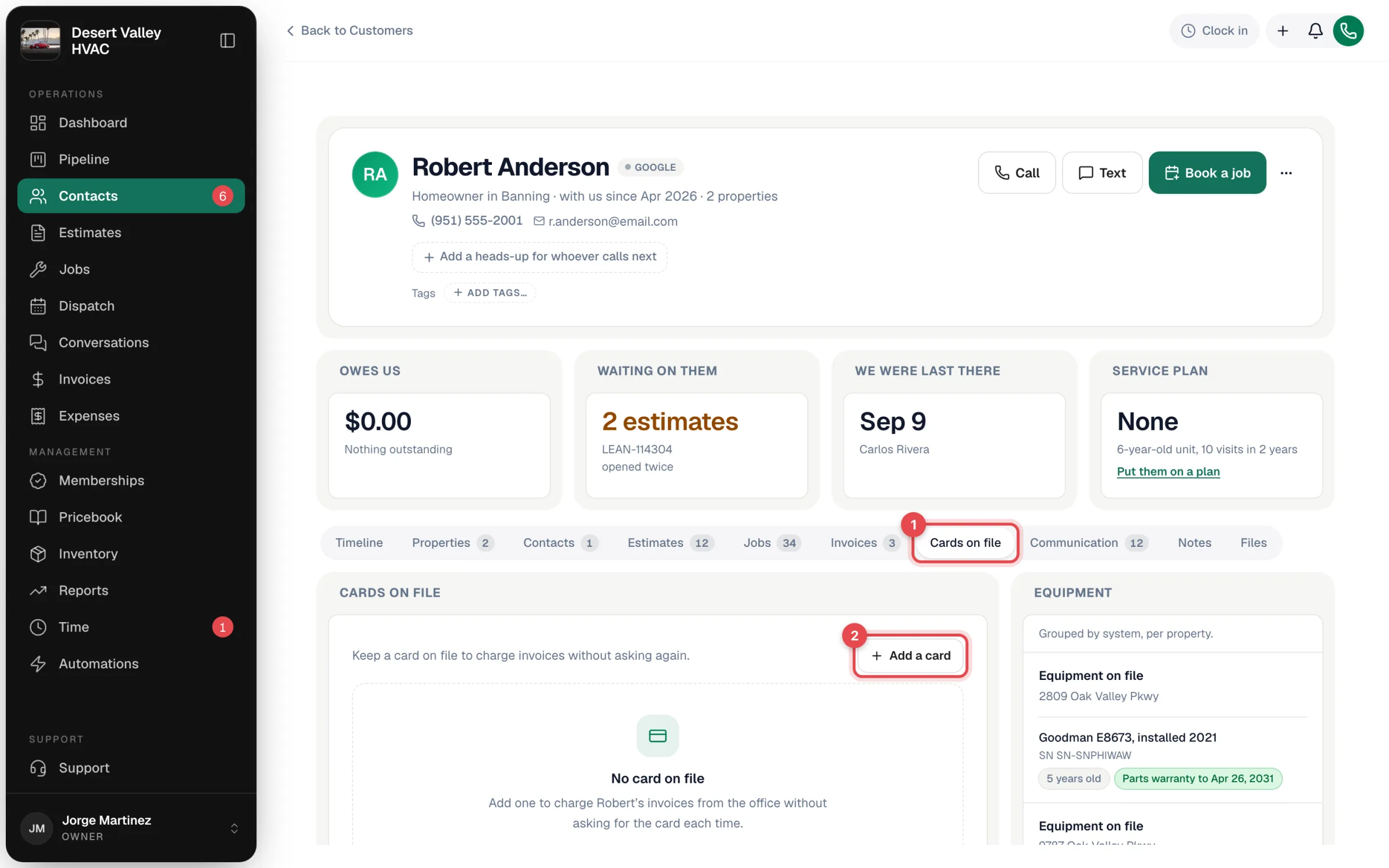
In the sidebar, open Contacts and then the customer. Click the Cards on file tab.
With no card saved yet, the tab shows No card on file and an Add a card button.
Add the card
- Click Add a card. The Add a card window opens with a secure card form.
- Type the card details as the customer reads them to you: card number, expiry, security code and ZIP. The details go straight from your browser to Stripe. They never pass through or get stored in Run a Call.
- Tick the permission box: "I have [customer]'s permission to keep this card on file and charge it for their invoices." If you add a card fee to online payments, the box also says so. Read that sentence to the customer.
- Click Save card.
The card appears in the list right away and becomes the default if it's the customer's first card.
What the customer receives
As soon as the card is saved, Run a Call sends the cardholder one confirmation. It goes by text if they have a phone number on file, and by email if they don't (or if the text can't be delivered):
[Your company] saved your Visa ending 4821 to pay future invoices. Reply to this message if that's not right.
If you charge a card fee, the message adds "A 3% card fee applies to card payments." (or whatever your rate is). The toast in the office tells you how the customer was told. For example, "Card ending 4821 saved. We texted Maria a confirmation." If no confirmation could be sent, the toast says the customer has no phone or email on file for one.
Manage saved cards
Each card on the tab shows the brand, the last four digits, the expiry date, and the date it was added. Badges flag the ones that need attention:
| Badge | Meaning |
|---|---|
| Default | The card preselected for charges, and the one offered when you turn on membership autopay. |
| Expired | The expiry date has passed, so a charge won't go through. Ask the customer for a new card. |
| Last charge failed | The last charge was declined. You can try again, or ask for a different card. |
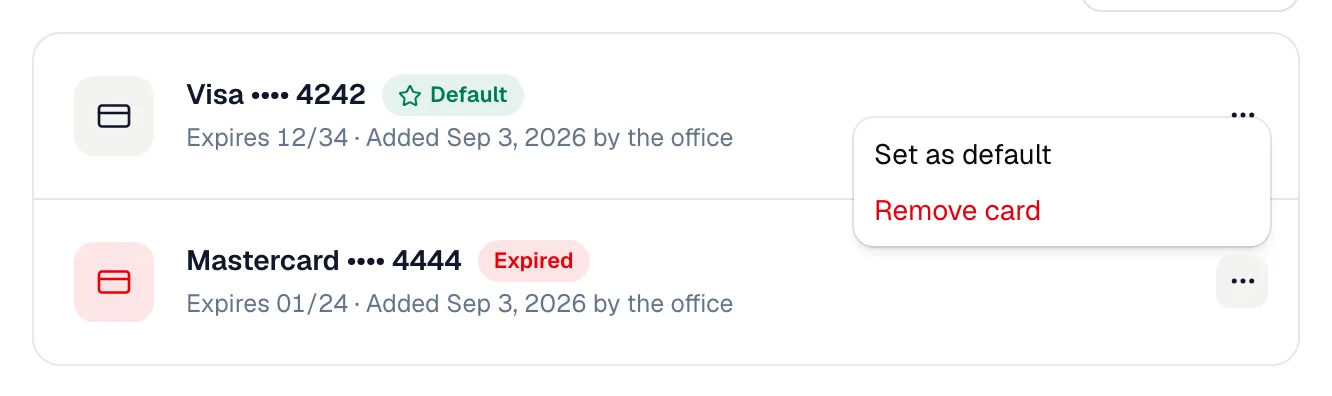
Open the ⋯ menu on a card to:
- Set as default — make this the card that's preselected for charges and offered for autopay. (Only shown on cards that aren't already the default.)
- Remove card — confirm Remove card in the Remove this card? window. The card is removed from your Stripe account and your company can't charge it again. If you removed the default card, the newest remaining card becomes the default.
When a customer's bank issues a replacement card, Stripe can update the saved card's details automatically. When that happens, the new expiry date and last four digits show on the tab.
Charge an invoice to the card
-
Open the invoice.
-
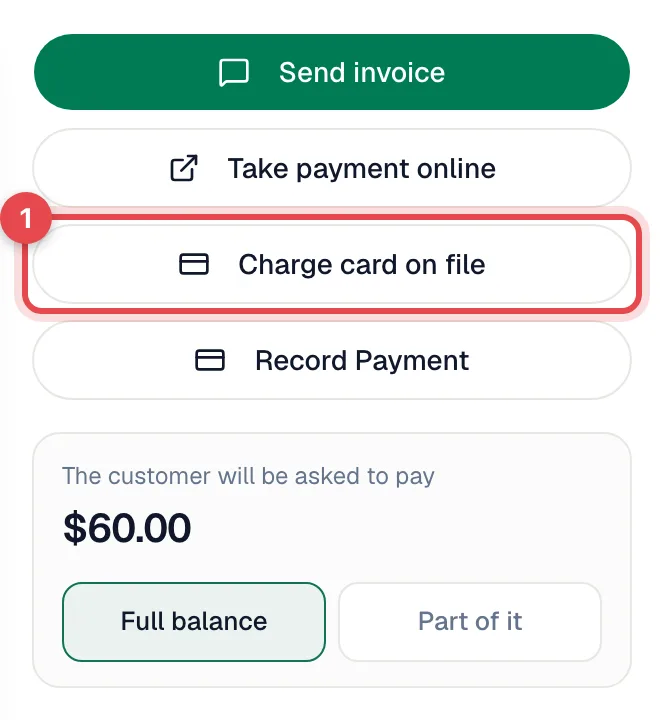
In the right-hand panel, click Charge card on file. The button shows when:
- the customer has a usable saved card,
- Stripe is connected,
- the invoice still has a balance, and
- card payments aren't turned off for that customer.
-
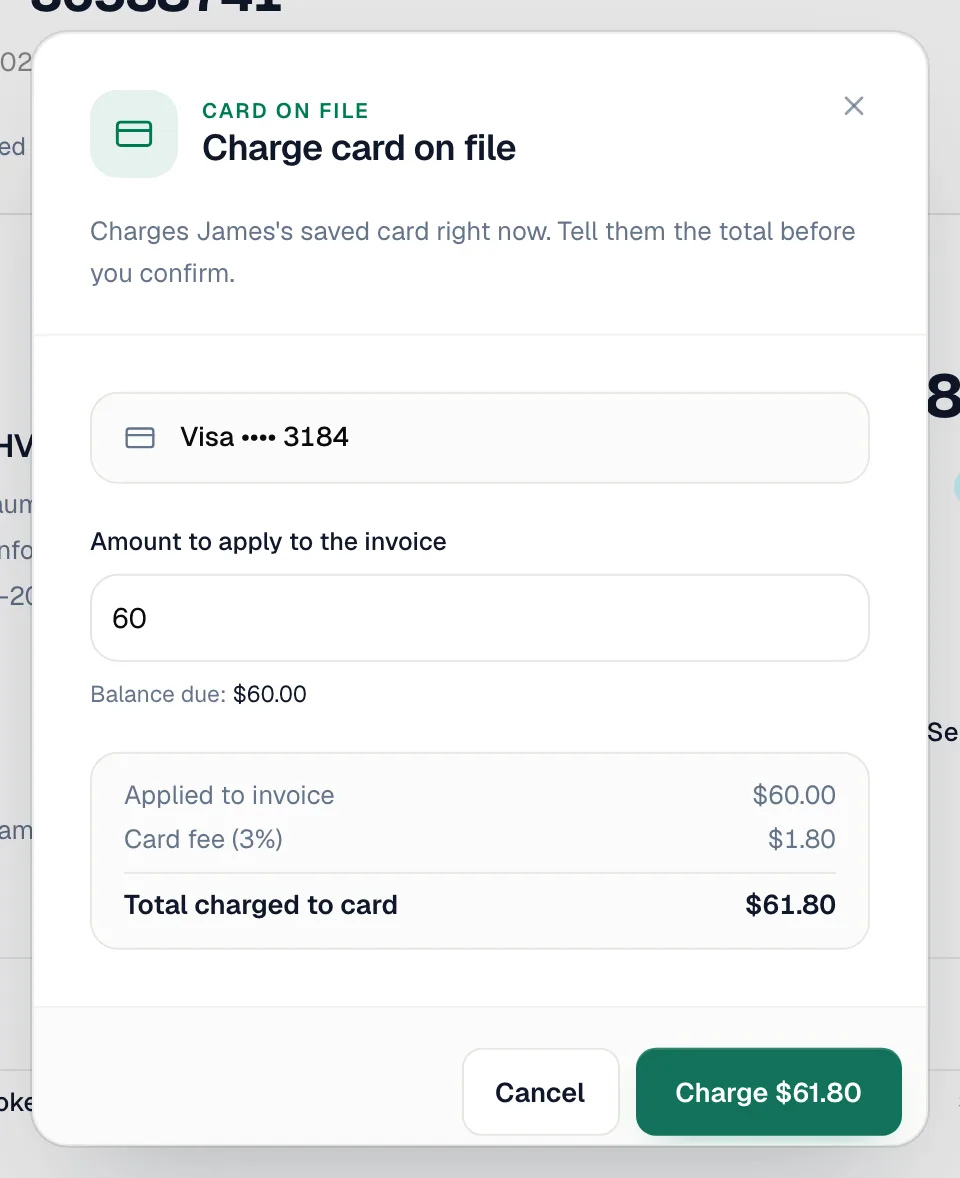
In the Charge card on file window:
- Pick the card if the customer has more than one. The default card is preselected.
- Check Amount to apply to the invoice. It starts at the full balance, and you can lower it to take a partial payment. Use full balance puts it back. The minimum charge is $0.50.
- If your company adds a card fee, the window shows Card fee and Total charged to card so you can tell the customer the exact total.
-
Tell the customer the total, then click Charge $X.
When the charge goes through, you see "Charged $X to the card ending 4821." (with "Invoice paid." added when it covers the whole balance). After that:
- Invoice status changes to Paid, or to Partial if you charged part of the balance.
- Payment history on the invoice records the payment. The activity trail logs Charged $X to the card on file ending 4821 along with who took it.
- Customer receipt goes out by email, if the customer has an email address.
- Job closes on its own when the invoice is paid in full and the work is done.
- QuickBooks receives the payment like any other card payment, if you've connected it.
If the charge doesn't go through
Nothing is charged. The window stays open and explains what happened:
| Message | What to do |
|---|---|
| The bank's decline reason, then "Nothing was charged." | Ask the customer for a different card, or send them the pay link. The card gets the Last charge failed badge. |
| "The customer's bank needs to verify this payment." | The bank wants the cardholder to approve it themselves. Send them the pay link so they can pay on their own device, or ask for a different card. |
| "This card was removed from Stripe" | The card was deleted in your Stripe account. Ask the customer for the card again. |
Membership autopay
A saved card can pay a customer's membership renewals automatically. Autopay is always an explicit choice and starts off:
- When enrolling in the office. On the review step of the enrollment, turn on Autopay with Visa •••• 4821.
- After enrolling. On the membership page, click the Autopay row and confirm Turn autopay on? Turning it off sends the customer an invoice each cycle instead.
- From the field app. When a tech sends a membership signup link to a customer who already has a card on file, they can tick Charge Visa •••• 4821 on each renewal.
The card is charged automatically when the renewal invoice is created, which happens the number of days before the renewal date set in Send renewal invoice this many days early under Settings → Memberships (most shops use 14). If the membership's card was removed or expired, the customer's current default card is used instead. Renewal charges include your card fee if you set one. When a renewal charge is declined, the member appears in the Card failed list on the Memberships page until a charge goes through. Call them for a new card. See Renewals and autopay.
Good to know
- Customers can't save a card themselves. The online pay page takes a one-time payment and doesn't offer to save the card. Cards on file are added by your office.
- Turning card payments off for a customer also stops cards being added or charged for them. An owner manages this list under Settings → Integrations → Stripe → Card payments by customer.
- Sample customers (the demo records some new accounts start with) can't have a card on file.
- Refunds aren't issued from Run a Call. Sign in to your Stripe Dashboard and refund the charge there.
- Security. Run a Call never sees, stores or sends a full card number. Stripe holds the card and handles card-security compliance.