
Run a Call takes online and in-person card payments (and bank payments, if you turn them on) through your own Stripe account. It also records the cash, checks and other payments you collect yourself. Every payment lands on an invoice, so the invoice status, the job and QuickBooks stay in step.
How a payment flows
- You send the invoice. The customer gets an email with a Pay Now button. If texting is on, the first send also texts them a pay link.
- The customer pays. They pay online, on a card reader with your tech, with a saved card your office charges, or by cash or check you record.
- The payment is recorded on the invoice. The invoice changes to Paid, or Partial if money is still owed.
- The job closes by itself once the work is done and the invoice is paid in full.
- Stripe pays out online and card-reader payments to your bank on your Stripe payout schedule.
- QuickBooks is updated, if you've connected it.
Ways to get paid
| Method | Where it happens | Needs Stripe? | Article |
|---|---|---|---|
| Online by card, Apple Pay, Google Pay or Link | The customer's pay page | Yes | Charging credit cards |
| Online by bank transfer (ACH) | The customer's pay page, once you turn it on | Yes | Enabling online payments with Stripe |
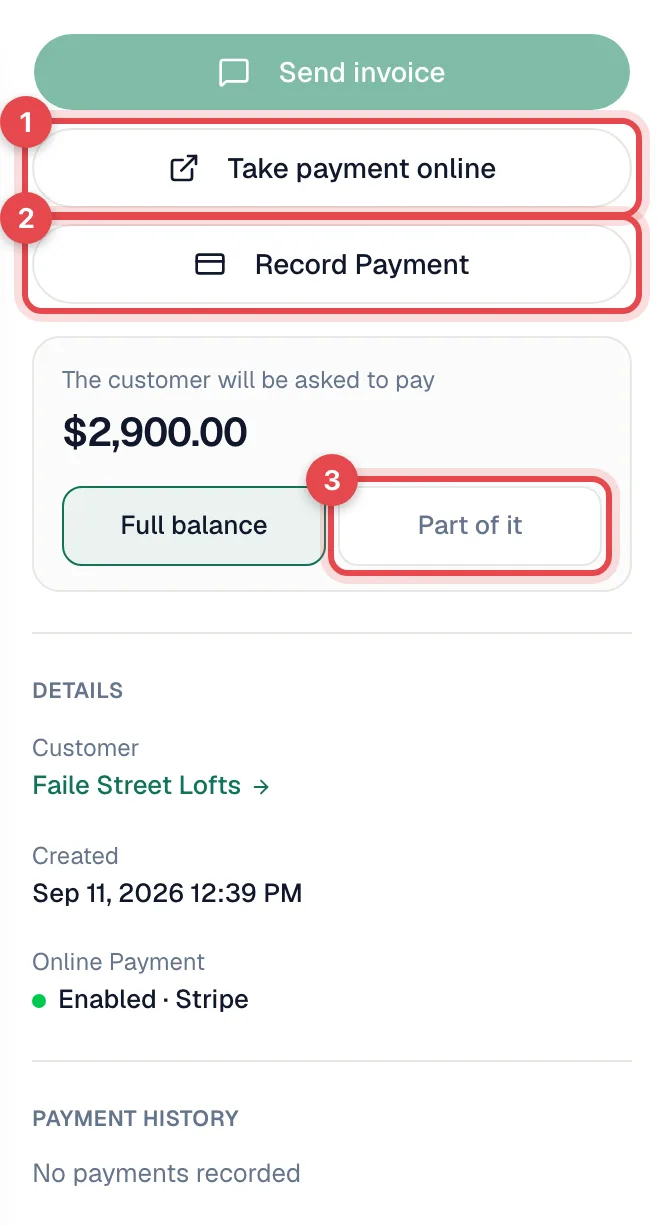
| Card over the phone | Take payment online on the invoice | Yes | Charging credit cards |
| Saved card | Charge card on file on the invoice, plus membership autopay | Yes | Adding a card on file for a customer |
| In person on a card reader | The field app, with a Stripe Reader M2 | Yes | Tap to Pay overview |
| Cash, check, Zelle, wire, financing | Record Payment on the invoice, or the field app | No | Collecting cash and other offline payments |
| Your own method names (GreenSky, Money Order…) | Same as above | No | Custom payment methods |
Stripe: your own account
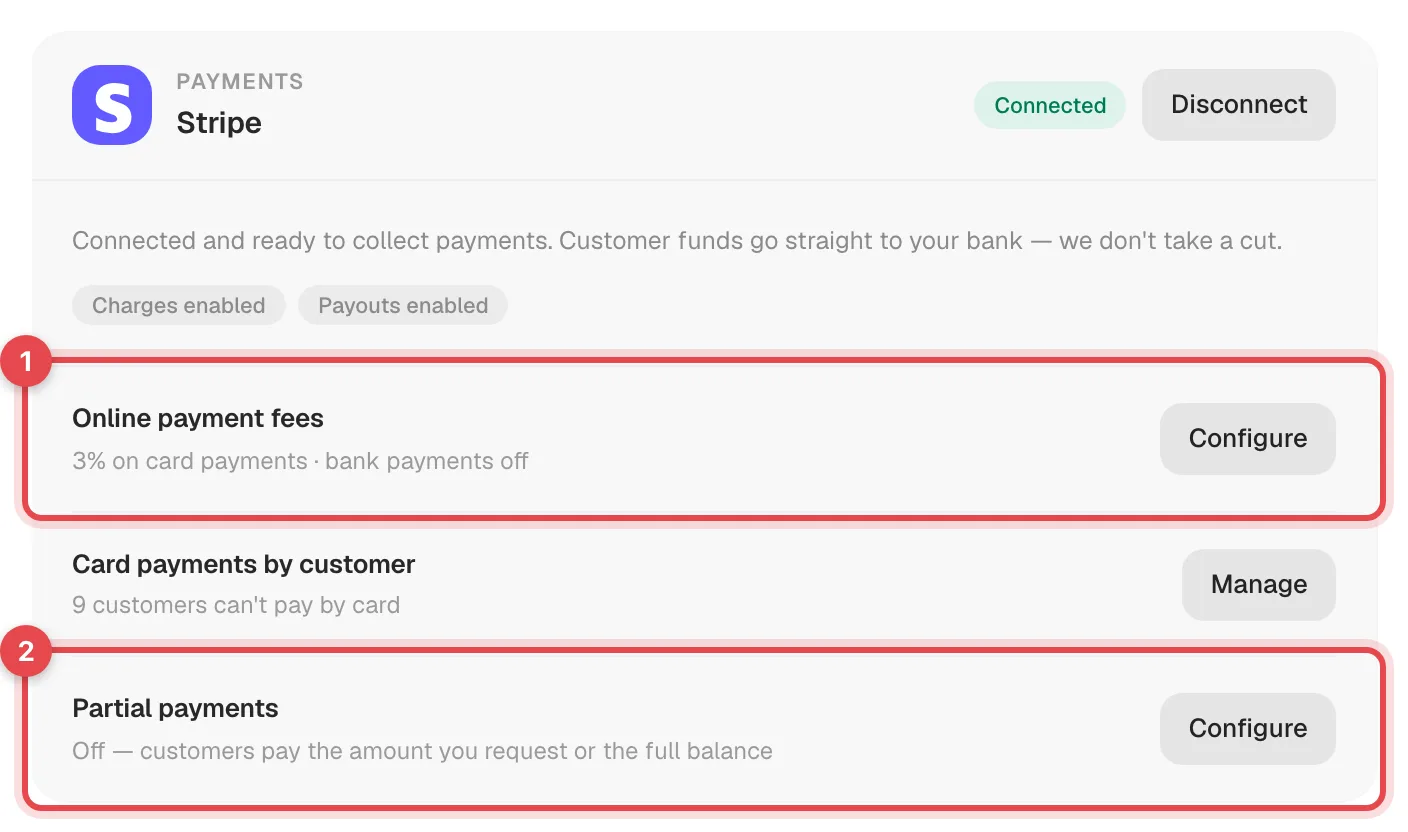
Online, saved-card and card-reader payments run through your company's Stripe account. The account owner connects it once in Settings → Integrations. Money goes straight from Stripe to your bank, and Run a Call doesn't take a cut. See Enabling online payments with Stripe.
No Stripe? You can still invoice. The pay page shows your How customers can pay you instructions instead of a Pay button. You set those instructions under the gear icon on the Invoices page.
Fees
| What | Who sets it |
|---|---|
| Stripe processing fees | Stripe charges its standard rates to your Stripe account. Check them in your Stripe Dashboard. Run a Call adds no processing markup. |
| Card fee you pass on (optional) | You choose a percentage under Settings → Integrations → Stripe → Online payment fees. It applies to online card payments, saved-card charges and card-reader payments, and customers always see it before they pay. |
| Bank fee you pass on (optional) | A separate percentage for bank payments. Leave it empty to keep bank payments free. |
Fees never apply to cash, checks or other payments you record by hand.
Partial payments and deposits
- Ask for part of one invoice: on the invoice, click Part of it and enter the amount or percentage.
- Let customers choose: turn on Partial payments under Settings → Integrations → Stripe so customers can pay any amount above a minimum you set.
- Deposits and progress payments on big jobs: add a payment schedule to the estimate. See Adding a payment schedule to an estimate.
Where payments show up
| Place | What you see |
|---|---|
| Invoice | Payment History with each payment's date, method, amount and status. |
| Customer's pay page | The customer's payment history and what's still owed. |
| Reports | Revenue and A/R aging reports under Reports (owners and admins). |
| Import & export | Settings → Import & export → Payments exports every payment to a spreadsheet (owners and admins). |
| QuickBooks | The payment, applied to the matching invoice. See How payments sync to QuickBooks Online. |
Refunds
Refunds aren't issued from Run a Call. Refund the payment in your Stripe Dashboard. For a cash or check payment recorded by mistake, an owner or admin can remove it from the invoice.