
Estimates aren't turned straight into invoices. The approved estimate becomes a job, and you invoice the job. Estimates with a payment schedule are the exception: each milestone is invoiced from the schedule. This article walks through both paths.
The usual path: estimate → job → invoice
Get the estimate approved
When the customer signs online, the job is created for you. If they approved by phone or in person, click Convert to job on the estimate. See Creating a job from an estimate.
Do the work
Schedule and complete the job. If the tech adds parts or extra work on site, it goes on the job, so the invoice reflects what was actually done.
Create the invoice from the job
Open the job and click Create invoice. Pick the Payment terms, then click Generate invoice. You can also start from Invoices → Generate invoice. Techs tap Generate Invoice on the job in the mobile app.
The draft invoice pulls in every line item on the job. Review it and click Send invoice. See How to create and send an invoice.
Need payment before the work starts? You can invoice a scheduled job too, not just a completed one. On the invoice, click Part of it to ask for a deposit, or collect the full amount up front.
Estimates with a payment schedule
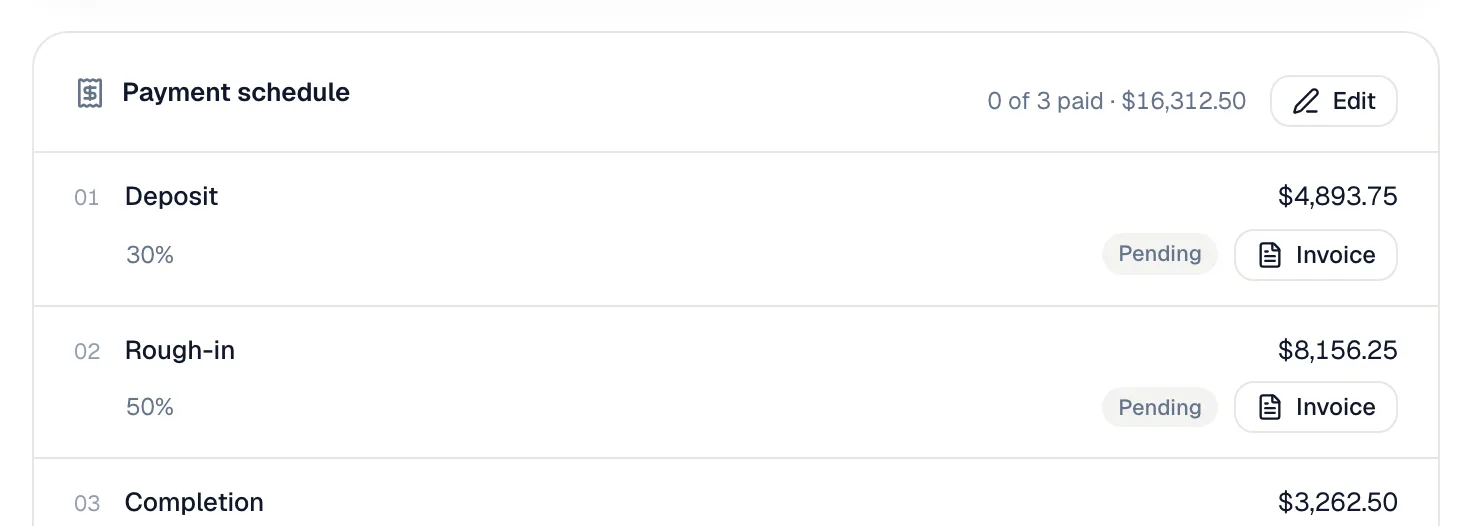
If the estimate has a payment schedule, each milestone is billed as its own invoice:
- The deposit invoice is created automatically when the customer approves (or when you convert), due on receipt.
- Later milestones are invoiced from the Payment schedule card on the estimate, the job or any milestone invoice. Click Invoice on a pending milestone, choose the terms, and click Create draft invoice.
- Extra work outside the plan is billed from the job with Invoice extras.
See Invoicing milestone payments.
What carries over
| From the estimate | Where it ends up |
|---|---|
| Customer, property and contact | On the job, then the invoice. |
| The chosen option's line items, including add-ons the customer ticked | On the job, then the invoice. |
| Prices and discounts | As they were on the estimate, unless you change the job. |
| Signed contract | In the job's files. |
| Signature and approval details | Stay on the estimate. |
| Valid until date | Stays on the estimate. The invoice gets its own due date from its payment terms. |