
An approved estimate becomes a job: the work the customer just bought. Most of the time this happens automatically when the customer signs. When they say yes by phone or in person, you convert it yourself.
When the customer approves online
When the customer signs on their approval page, Run a Call creates the job for them. You don't need to do anything. The job:
- has the line items of the option they chose, including any add-ons they ticked,
- is ready to schedule, and shows on the dispatch board's unscheduled list,
- carries the summary of work, the contact and the Sold by person from the estimate,
- gets the signed contract saved to its files, if a contract was attached.
If the estimate was built from an existing job, for example a repair visit where the tech quoted a replacement, the sold work is added to that job and no new job is created.
Your team gets a notification, and the estimate page shows Converted — This estimate is now a job. with a View job button.
If the estimate has a payment schedule, the deposit invoice is created at the same moment, due on receipt. It's sent to the customer unless you turned that off in the schedule.
Convert an estimate yourself
Use this when the customer approved by phone or in person, or when you want to send a tech to present the estimate.
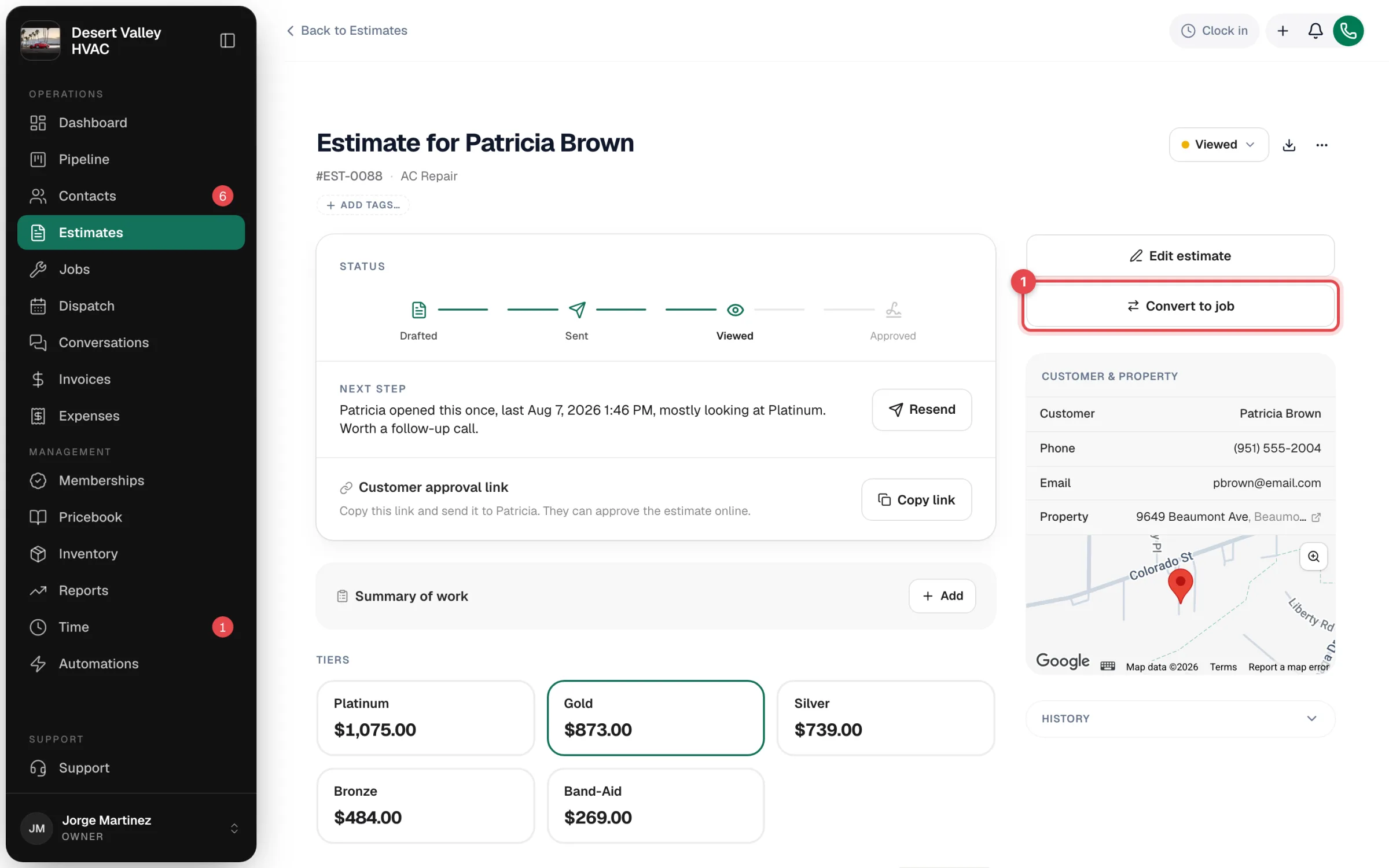
Click Convert to job
Open the estimate and click Convert to job. You'll find it in the next-step bar on an approved estimate, and on the right for a sent or viewed one.
Say whether the customer approved
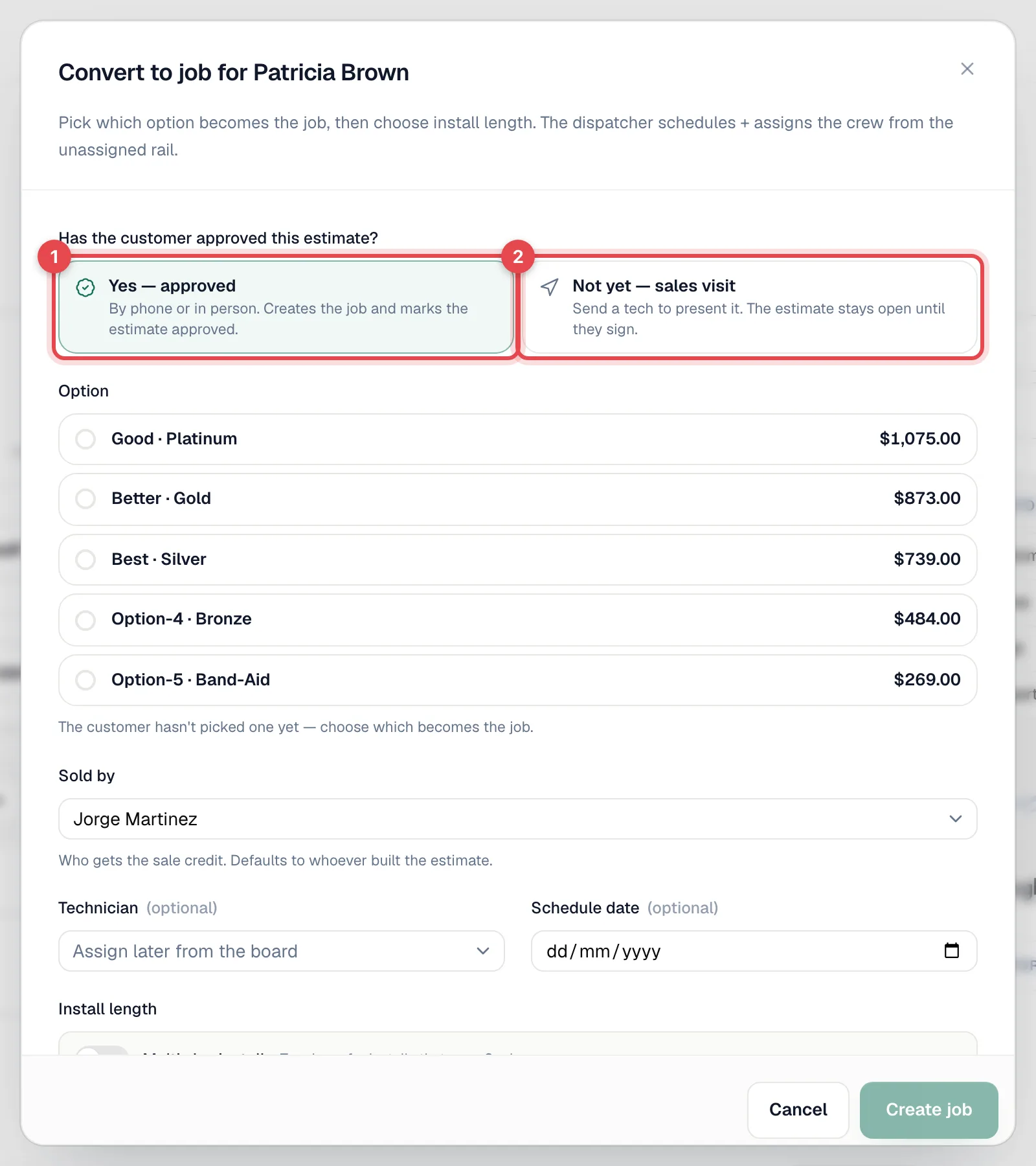
For an estimate that isn't approved yet, answer Has the customer approved this estimate?
| Choice | What happens |
|---|---|
| Yes — approved | By phone or in person. Creates the job and marks the estimate approved. |
| Not yet — sales visit | Send a tech to present it. The estimate stays open until they sign. Pick a Technician, Visit date and Visit time, or leave them empty to assign the visit later from the dispatch board. |
Set up the job
- Option — if the customer hasn't picked one yet, choose which option becomes the job.
- Install length — one day, or a multi-day install with the same crew. See Planning multi-day jobs.
- Scheduling, crew and job details — fill in what you know now, or leave them for dispatch.
- Sold by — who gets credit for the sale. It defaults to whoever built the estimate.
Create the job
Click Create job (or Create N-day install). For a sales visit, click Schedule sales visit or Save sales visit.
Choosing Yes — approved marks the estimate Approved and generates the deposit invoice if there's a payment schedule. A job without a date shows on the dispatch board's unscheduled list, ready to schedule.
You can't convert a Declined or Expired estimate, or one with a contract the customer hasn't signed yet. For an expired estimate, extend its validity and resend it first. For a contract, send the customer the link to sign.
Approving without creating a job
To record an approval without making a job yet, change the estimate's status to Approved. In the Approve estimate window, pick the Approved option and Sold by, and turn off Create a job from this estimate. You can click Convert to job later.
If the scope changes after approval
The approved estimate stays exactly as the customer signed it. Make changes on the job instead: add or remove line items there, and the invoice bills what's on the job. For payment-schedule jobs, extra work is billed separately with Invoice extras. See Invoicing milestone payments.