
Delete a customer when the record shouldn't exist at all — a duplicate, a practice record from setup, a spam booking. If it's a real customer you've simply stopped working with, keep the record and mark them Inactive instead so their history stays easy to find.
Who can do this
Anyone whose role can edit customers — by default owners, admins and dispatchers.
Before you delete: is it a duplicate?
If the record is a second copy of a customer you already have, merge it instead of deleting it. Merging moves every job, invoice, call and note onto the record you keep; deleting leaves that history attached to a record nobody can open. See Finding and merging duplicate customers.
Open the customer
Click Contacts in the sidebar and open the customer.
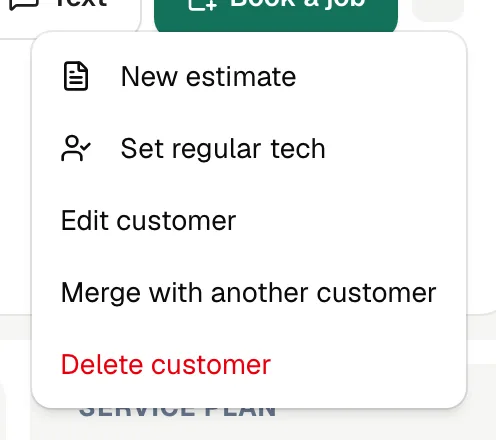
Choose Delete customer
In the header, click ⋯ and choose Delete customer.
Confirm
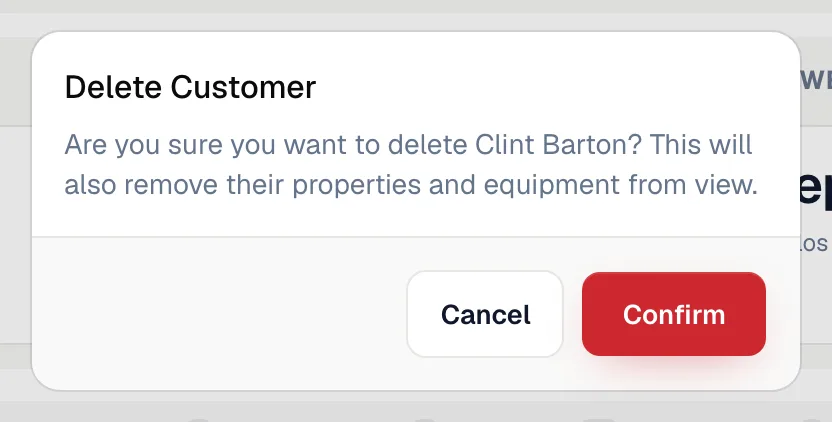
Run a Call asks Are you sure you want to delete [name]? This will also remove their properties and equipment from view. Click Confirm to delete.
What happens
| What | Result |
|---|---|
| The customer | Disappears from Contacts, search, the Pipeline board and customer pickers. |
| Their properties and equipment | Removed from view with the customer. |
| Sites under a parent account | If you delete a parent account, its sites stay as their own customers — they're just no longer linked to a parent. |
| QuickBooks Online | If you're connected, the customer is made inactive in QuickBooks. |
Run a Call doesn't stop you from deleting a customer who has jobs, invoices or payments, and there's no undo button in the app. Double-check you have the right record. If you delete one by mistake, contact support at admin@runacall.com as soon as possible.
Marking a customer Inactive instead
Inactive keeps the customer searchable, with every job, invoice and call still attached.
- Click Pipeline in the sidebar, then the Contacts board.
- Drag the customer's card to the Inactive column, or click the status pill on the card and choose Inactive.
You can bring them back any time by moving the card to Lead or Prospect. See Marking a lead inactive.
Customer asked you to delete their data
For a privacy request (for example under CCPA), email admin@runacall.com. Some records, such as paid invoices, may need to be kept for tax purposes.