
Every estimate has one of six statuses. The status tells you where the sale stands and what, if anything, to do next.
The statuses
| Status | What it means | What to do |
|---|---|---|
| Draft | Saved but not sent. The customer can't open it. | Finish it and click Send estimate. |
| Sent | Emailed to the customer. They haven't opened it yet. | Wait, or click Resend if they can't find the email. |
| Viewed | The customer opened the approval link. | Follow up. The estimate page shows how often they looked and which option. |
| Approved | The customer signed, or your team recorded the approval. | Schedule the job that was created. |
| Declined | The customer tapped No thanks, or your team marked it declined. | Read their reason. Duplicate the estimate to make a new offer. |
| Expired | The Valid until date passed before the customer approved. | Click Resend and set a New validity date. |
What changes a status
| From | To | What causes it |
|---|---|---|
| Draft | Sent | You send the estimate. |
| Sent | Viewed | The customer opens the approval link. |
| Sent or Viewed | Approved | The customer signs, or someone on your team changes the status to Approved or clicks Convert to job. |
| Sent or Viewed | Declined | The customer declines, or someone on your team changes the status. |
| Sent or Viewed | Expired | The Valid until date passes. A daily check marks it, and so does the customer opening the link after that date. |
| Expired | Sent | You extend the validity and resend. |
You can also change the status by hand with the status menu at the top of the estimate. Approved estimates are locked, so their status can't be changed.
What happens at each status
| Status | What changes |
|---|---|
| Sent / Viewed | You can still click Edit estimate. The customer's link shows your changes right away. |
| Approved | A job is created (or the work is added to the job the estimate came from). If there's a payment schedule, the deposit invoice is created. The estimate can't be edited anymore; the link becomes the customer's project page. |
| Declined | The customer's reason shows on the estimate. It can't be sent again. |
| Expired | The customer's link says the estimate has expired and asks them to call you. They can't approve it. |
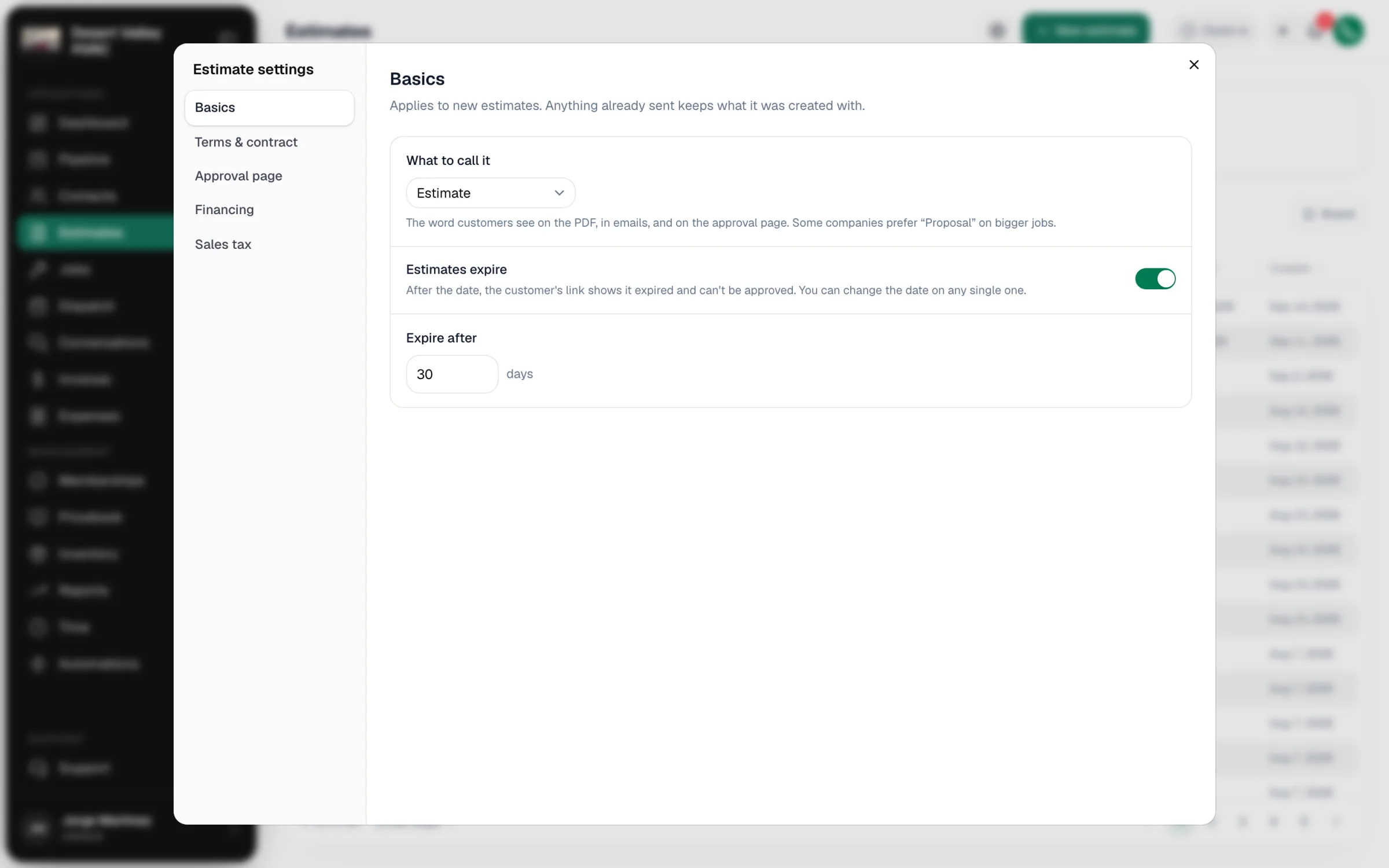
To stop estimates from expiring, or to change how long they stay valid, open Estimates, click the gear (Estimate settings), and go to Basics. Set Estimates expire and Expire after (30 days by default).
Finding estimates by status
At the top of the Estimates page, the Draft, Sent and Approved tiles show counts. The Status filter lets you pick Draft, Sent, Viewed, Approved, Declined or Expired. Useful views:
- Viewed — customers who looked but haven't decided. Your best follow-up list.
- Declined — to spot patterns in why you're losing jobs.
- Board — shows estimates as cards by stage.