
Settings is where you set up your company, your team, and your own account. What you see there depends on your role: owners see every section, a technician sees only their own profile.
Open Settings
On a computer, click your name in the bottom-left corner of the sidebar. The menu that opens has shortcuts to Profile, Business, and Billing (the ones your role can open). Once you're in Settings, every section you can use is listed down the left side of the page, grouped under Account, Workspace, Customer-facing, Billing & plans, and System.
On a phone, open the menu and tap Settings. Settings opens as a list first: tap a section to open it, and use the back arrow to return to the list.
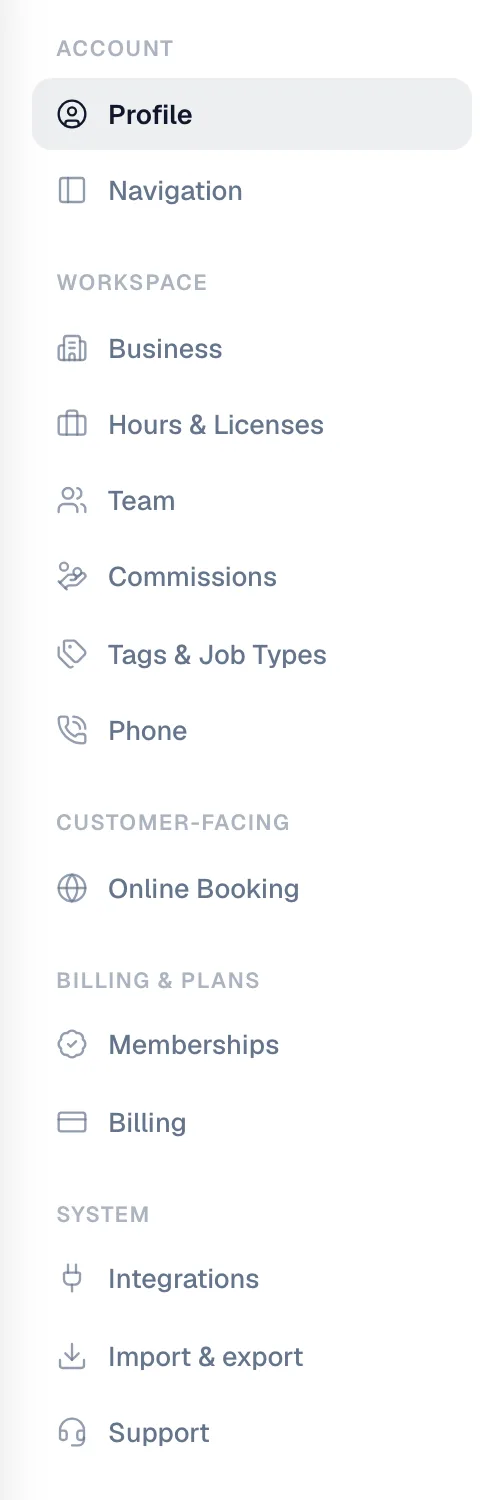
Every section, and who sees it
The table uses the built-in roles. If your company made its own roles, what each person sees follows the permissions on their role. See Customizing team roles and permissions.
| Section | What it controls | Who sees it |
|---|---|---|
| Profile | Your name, phone, photo, password, connected calendars, and the devices you're signed in on | Everyone |
| Navigation | Reorder or hide items in your left sidebar. Nobody else is affected. | Everyone |
| Business | Company name, logo, phone, email, website, Google review link, address, timezone, brand color, document design, and (owners only) the daily digest email | Owner, Admin |
| Hours & Licenses | License numbers printed on paperwork, job numbering, sales tax rates, inventory tracking, payment methods, and business hours | Owner, Admin |
| Team | Invite and manage people, roles, business units, and skills | Owner, Admin |
| Commissions | Commission plans — how the work someone sells turns into their pay | Owner |
| Tags & Job Types | The tags and job types everyone picks from | Owner, Admin, Dispatcher |
| Phone | Phone numbers, texting, calling, call flows, the AI Receptionist, call scripts, blocked numbers, and usage | Owner, Admin |
| Online Booking | Your public booking page, plus a personal switch to get an email about new leads | Everyone (the booking page setup itself is owner and admin only) |
| Memberships | Membership plan settings | Owner |
| Billing | Your Run a Call subscription, add-ons, and invoices from Run a Call | Owner, Admin |
| Integrations | Online payments (Stripe), Tap to Pay, QuickBooks, financing, API keys, and webhooks | Owner |
| Import & export | Import customers or your pricebook from a spreadsheet, and download your data | Owner, Admin |
| Support | Send the Run a Call team a question and see past requests | Everyone |
Technicians use the mobile field app, which has its own Profile tab instead of this Settings area. From there they can change their photo, see their schedule, and reach Help & support.
Some settings live on the page they affect
A few settings sit behind a gear on the page where you use them, not in Settings:
- Invoice settings (numbering, payment terms, payment instructions, terms & conditions) — the gear on the Invoices page.
- Estimate settings (what estimates are called, expiry, terms, the approval page, financing) — the gear on the Estimates page.
- Automated texts and emails — the Automations page in the left sidebar.
- Missed-call and voicemail alerts, ringtone — Settings → Phone → Voice for owners and admins; Settings → Profile for dispatchers.
Settings save as you go
Most settings pages save automatically a moment after you change something. You'll see a small Saved message. Pages with a button (like your profile's Save changes or Update password) save when you click it.