
Run a Call handles the routine follow-up on memberships for you: renewal invoices are created ahead of time, overdue members get reminders, long-overdue memberships pause themselves, and your office is nudged about tune-ups that are coming due. This article covers what runs automatically, who receives what, and the settings that control it.
What runs automatically
| When | What happens | Who it goes to |
|---|---|---|
| Before each billing date (14 days by default) | The renewal invoice is created as a draft, and charged to the card if the member is on autopay. | Your office: Renewal invoices ready to collect notification. |
| 7 days overdue | Text message with a reminder that the renewal is overdue. Needs a mobile number on the customer. | Customer |
| 14 days overdue | Email: Membership overdue — 2 week reminder. | Customer |
| 30 days overdue | Email warning that the membership will be paused in 24 hours. | Customer |
| After the auto-pause day (30 days overdue by default, and never before the 30-day warning has gone out) | The membership is paused (benefits frozen until they pay) and a Membership suspended confirmation email is sent. | Customer |
| Every Monday morning | A summary of the tune-ups coming due. | Your office, in-app |
| When the owner schedules a price change | Membership price change notice email with the new price and when it starts. | Members on that plan |
"Overdue" counts from the invoice due date plus the grace period (7 days by default), so with the defaults the text goes out 14 days after the due date. Paying at any point stops the reminders, and the membership rolls forward.
The overdue reminders go out for any unpaid renewal invoice, including drafts you never sent. Send renewal invoices (or use autopay) so a member isn't reminded about a bill they never received.
Customers don't get automatic reminders to book their tune-ups. Your office schedules them from Memberships → Today → Tune-ups due. See Scheduling membership tune-ups.
Good to know:
- Memberships imported from a previous system don't receive the overdue reminders.
- The text needs a mobile number on the customer, and the emails need an email address.
- A membership is only paused automatically after the 30-day warning email has gone out. If the customer has no email address, or you turned that email off in Automations, the membership isn't paused automatically; suspend it yourself from the membership page.
Settings (owner only)
Go to Settings → Memberships (Membership renewal settings). Changes take effect the next morning, when the daily renewal and reminder runs happen. Click How it works for a summary, and Save changes when you're done.
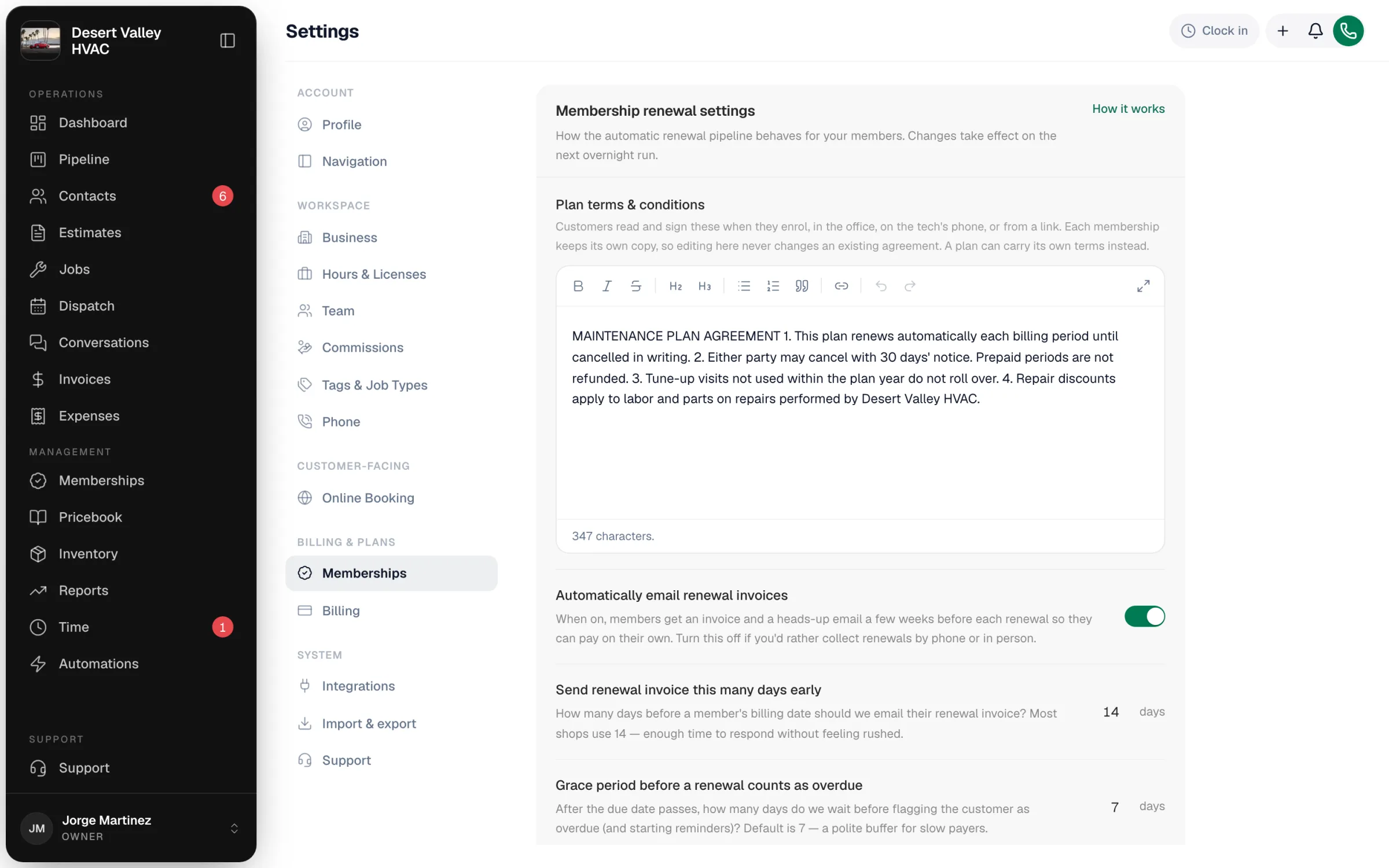
| Setting | Default | What it does |
|---|---|---|
| Plan terms & conditions | Empty | The terms customers read and sign when they enroll. Each membership keeps its own signed copy, so edits never change existing agreements. A plan can use its own terms instead. |
| Automatically email renewal invoices | On | Creates renewal invoices (and charges autopay cards) ahead of each billing date. Despite the name, the invoices aren't emailed. See the warning below before turning it off. |
| Send renewal invoice this many days early | 14 days | How far ahead of the billing date the renewal invoice is created (1–60). |
| Grace period before a renewal counts as overdue | 7 days | Days after the due date before reminders start (0–30). |
| When a tech arrives at an overdue member's home | Show a banner; collect at the door | The tech sees Membership renewal overdue with the amount and a Mark paid option. With Block service until paid, the banner reads Cannot service until paid; an owner or admin can override on site. |
| Auto-pause membership after this many days overdue | 30 days | When an unpaid membership is paused automatically. |
With Automatically email renewal invoices on, renewal invoices are created as drafts; they aren't sent to the customer until you send them. Send them from the invoice, or put members on autopay. See Renewals and autopay.
Turning Automatically email renewal invoices off stops renewal invoices and autopay charges for every member. A membership whose paid-through date passes without a renewal then expires once the grace period is over. Only turn it off if your office collects every renewal with Collect renewal before it's due.
Turn individual emails on or off
The customer emails live in Automations, in the Memberships folder of the system templates: Membership overdue — 2 week reminder, Membership overdue — 24-hour suspension warning, Membership suspended confirmation, Membership price change notice and Membership re-engagement (we miss you). Turn one off to stop that email; the rest of the schedule keeps running. See Membership renewal and dunning emails.
Build your own membership automations
For anything else, such as a welcome text after enrollment or a thank-you when a membership renews, build a custom automation with the When a membership is created or When a membership renews trigger. See Building a custom automation.