
Included tune-ups don't schedule themselves. Run a Call tracks each member's Next tune-up date and lists the members who are due, so your office can book the visit when it suits the customer and the schedule.
Find members who are due
Go to Memberships. On the Today tab, the Tune-ups due tile lists members whose next tune-up is within the next 7 days or already overdue, earliest first. Each row shows the plan, when the tune-up is due, and whether a job is already booked (No job yet).
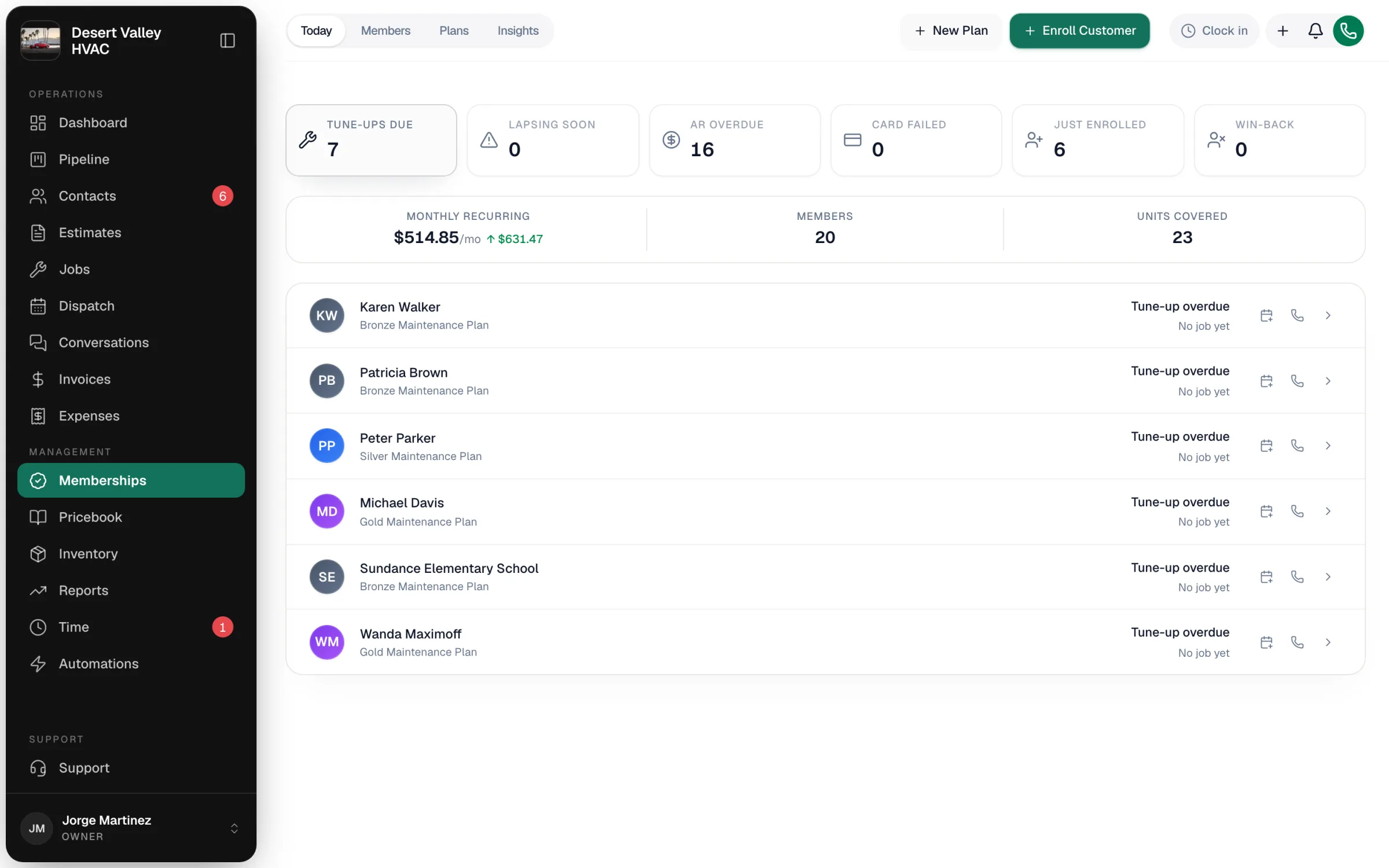
Every Monday morning your office also gets an in-app notification summarizing the tune-ups coming due.
Schedule the tune-up
- In Tune-ups due, click the calendar icon on the member's row (Schedule this tune-up). You can also click Schedule tune-up on the membership page.
- The new job form opens with the customer, the membership and the plan's tune-up job type filled in.
- Pick the date, time and technician, add any parts and labor, and create the job as usual.
Once a job is booked, the row offers Open scheduled job instead. The phone icon calls the customer, and the arrow opens the membership.
Covered visits vs repair visits
A member's job is a covered visit when its job type is one of the plan's Tune-up job types (jobs typed Maintenance always count). This works whether you schedule from Tune-ups due or book the job from the regular new job form. Any other job for a member is a repair visit at the member rate.
| On a covered visit | |
|---|---|
| The tech sees | A member card at the top of the job (Today's visit is included in Gold Maintenance Plan), and the Membership row shows the plan and which visit this is, for example Visit 2 of 2. |
| When the job is completed | The visit is used and the membership's Next tune-up date moves forward by the plan's interval (for example from a fall heating check to a spring cooling check). |
| The membership page | Tune-ups used goes up and the visit appears on the Lifecycle timeline. |
Lines on a covered visit keep their pricebook prices. When you create the invoice from the job, those lines are counted as included in the plan so the member's savings can be tracked, but the invoice still charges them. If the tune-up is fully covered by the plan, don't bill those lines to the customer.
Change when a tune-up is due
On the membership page, click the pencil next to Next tune-up, pick the date and click Save date. The member moves in or out of Tune-ups due accordingly.
Good to know
- Tune-up jobs are never created automatically, so there are no placeholder jobs cluttering your dispatch board.
- Paused, cancelled and expired memberships don't come due.
- Members with no covered visit in 18 months or more show under Win-back on the Today tab, where you can send a we miss you email.