
Extend term adds covered years to a membership at no charge. Use it when a customer earns extra time, such as a free year that comes with a new install. Nothing is invoiced and the plan doesn't change. The membership is simply covered for longer.
Who can do this: owners, admins and dispatchers.
Open the membership
Go to Memberships → Members and click the customer, or open it from the Membership card on the customer's page.
Click Extend term
Extend term is in the action buttons on the right of the page, with Collect renewal and Schedule tune-up. It's there for memberships that are Active or Not renewing.
Choose how long
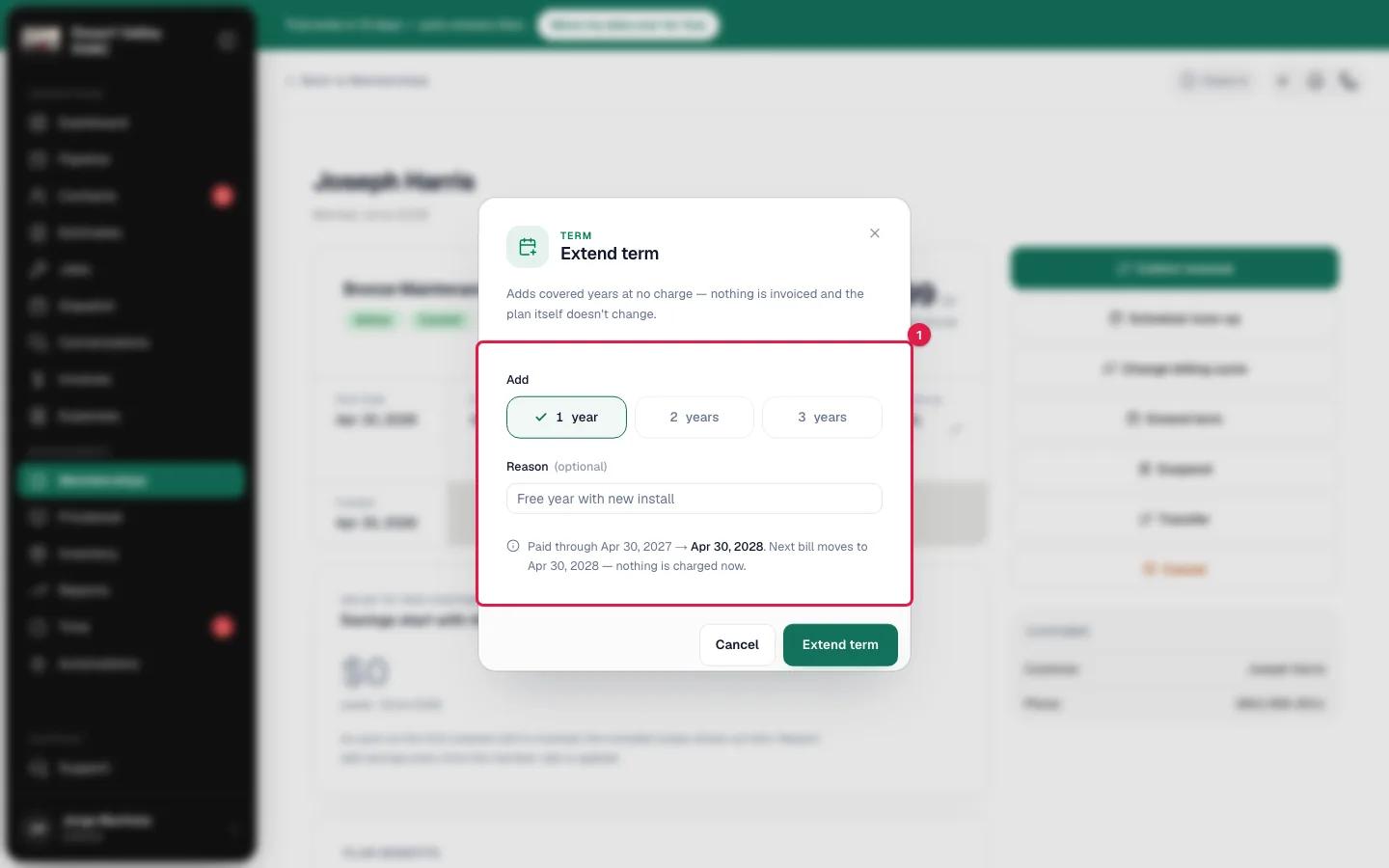
- Under Add, pick 1 year, 2 years or 3 years.
- Optionally type a Reason, such as Free year with new install. It's saved with the change.
- Read the line at the bottom. It shows the change before you make it, for example: Paid through Mar 1, 2027 → Mar 1, 2028. Next bill moves to Mar 1, 2028 — nothing is charged now.
- Click Extend term.
You see Term extended — now through followed by the new date.
What changes
| On the membership | What happens |
|---|---|
| End Date (or Term ends on a multi-year plan paid up front) | Moves out by the years you added. |
| Next Billing | Moves out by the same number of years, so the added time is free. The customer isn't billed until the new date. |
| Start Date | Doesn't move. It stays the anniversary of the membership. |
| Next tune-up | Doesn't move. The tune-up schedule carries on as it was. |
| Tune-ups used | Unchanged when you extend in the middle of a term. If the term had already run out, the extension starts a new plan year and the count starts again. |
| Status | Unchanged. A Not renewing membership stays not renewing; it just ends later. Click Reactivate if the customer also wants to renew again. |
| Lifecycle | A new entry such as Extended 1 year — now through Mar 1, 2028, with your reason, the previous date and who made the change. |
If a renewal invoice is open
You can't extend a membership while it has an open renewal invoice. You see the invoice number and Void it or record its payment first, then extend.
This is deliberate. Moving the billing date while a renewal is waiting to be paid would leave that invoice out of step with the membership, and paying it later wouldn't move the membership forward. Open the invoice from the Payments card on the membership, then either record the payment or void it, and extend afterwards.
Good to know
- A membership with no Next Billing date (a one-time plan that's been paid, or some memberships brought over from another system) still extends: the End Date moves and no billing date is created.
- Paused memberships don't show the button. Click Reactivate first.
- Cancelled and expired memberships can't be extended. Enroll the customer again instead.
- Extending doesn't notify the customer. Tell them yourself if the free year is part of what you sold.
- To charge for more time, don't extend. Use Collect renewal. See Renewals and autopay.