
Job Profitability shows what each finished job actually made after labor and materials — and which jobs lost money. Use it to find the kinds of work, and the techs, that carry the business.
Open it from Reports → Money → Job Profitability. Owners and admins can see it.
Which jobs are counted
Jobs that are Completed, Invoiced or Closed, have revenue, and were completed during the range you pick. Cancelled jobs and jobs with no revenue are left out.
How the numbers are worked out
| Number | Where it comes from |
|---|---|
| Revenue | The job's line items — what you're charging the customer for the work (after line discounts). |
| Labor | Labor hours × the job's Hourly rate ($). Hours typed into the job's Labor hours field win; otherwise the on-site time techs clocked on the job is used (every tech's time, so a lead and a helper both count). If the hourly rate is blank when the job is completed, the assigned tech's hourly rate is filled in. |
| Material | The cost of parts. Once the job has a purchase order that's Ordered, Received or Billed, its PO line costs are used. Until then, the pricebook costs on the job's line items are used. |
| Expenses on the job | Receipts and purchases logged against the job (anything not rejected) also count as cost. |
| Profit | Revenue − total cost (labor + material + job expenses). |
| Margin | Profit as a share of revenue. |
The tiles
| Tile | What it shows |
|---|---|
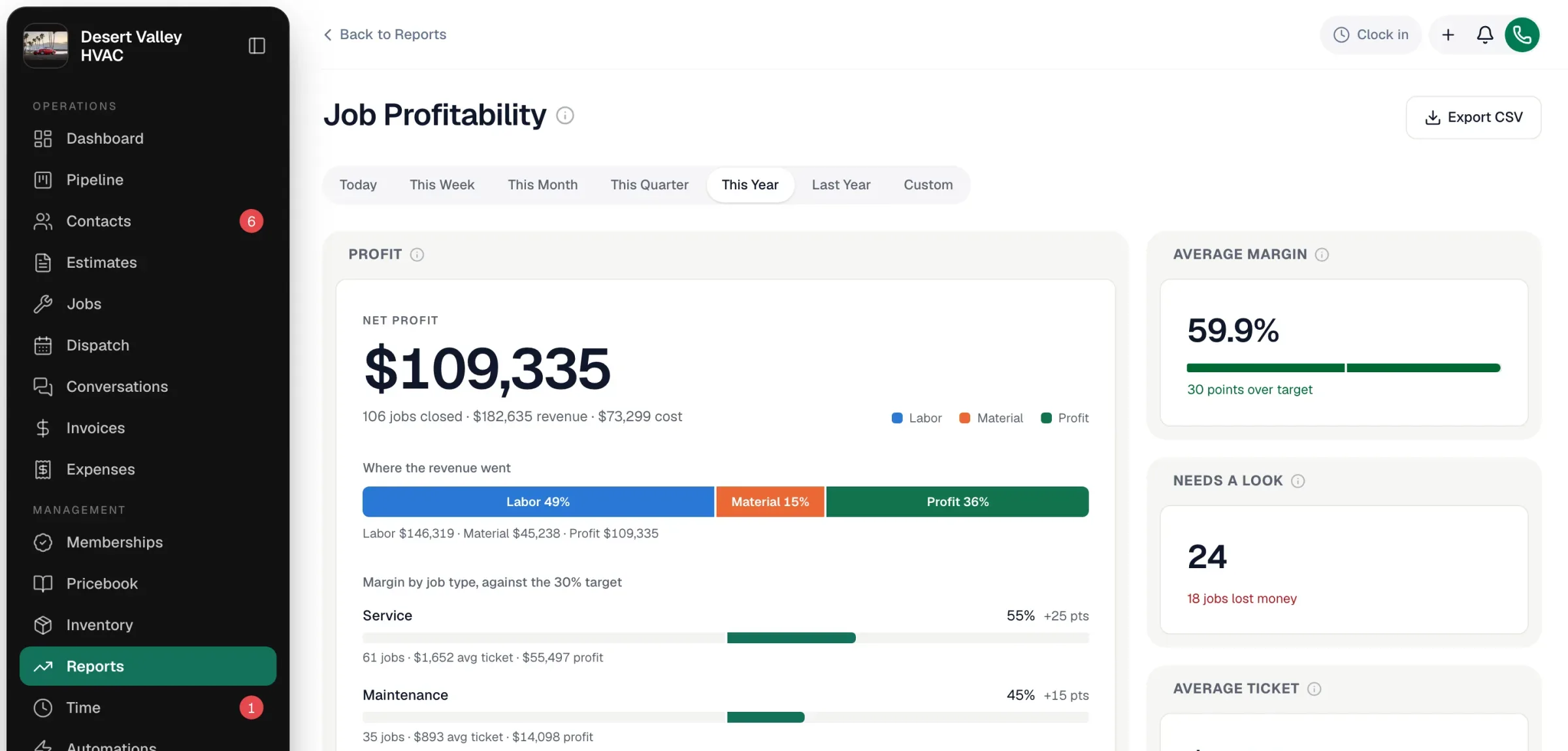
| Profit | Net profit for every job closed in the range, how much revenue and cost it took, Where the revenue went (labor, material, profit), and margin by job type against the 30% target. |
| Average margin | Profit as a share of revenue across all closed jobs, against the 30% target. |
| Needs a look | Jobs whose margin may be off: labor not entered, draft purchase orders whose cost isn't counted yet, purchase orders not yet billed, or an outright loss. |
| Average ticket | Revenue ÷ closed jobs, with the average cost per job. |
| By job type | Revenue by kind of work. Click a type to filter the table below. |
| By technician | Profit per tech (the job's assigned tech). Click a name to filter the table. |
| Margin spread | How many jobs landed in each band — Lost money, Thin · 0–15%, Fair · 15–30%, Strong · over 30% — and the profit each band made. |
| Every job | One row per job with closed date, customer, type, tech, revenue, cost, labor, material, profit and margin. Sort any column; use the Needs a look and Lost money chips to narrow it. |
Getting trustworthy margins
| If you see… | Fix it by… |
|---|---|
| Margins that look too good (lots of 90%+) | Entering labor hours and an hourly rate on jobs, or setting each tech's hourly rate so it fills in automatically. |
| Jobs flagged for draft or unbilled POs | Moving the purchase order along — material cost uses PO costs once the PO is ordered. |
| Material cost of $0 | Adding costs to your pricebook items, or linking the parts purchase order to the job. |
Profit and Margin always use the labor described above. The separate Labor figure (in Where the revenue went and the Labor column) and the "No labor entered" flag read the job's start-to-finish time recorded when it was completed, times its hourly rate. So on a job where the only labor is hours typed on the job or on-site time techs clocked, the Labor figure can show less than the labor already inside Profit — trust Profit and Margin.
Export
Export CSV downloads the summary, the by-type and by-technician tables, and every job row.