
The Technician Scoreboard puts every tech on one board: what they sold, the jobs they finished, their average ticket, margin and close rate, the memberships they enrolled, how often they sell beyond the service call fee, and the leads they flag. Each column opens a detail report when you want the "why" behind a number.
Open it from Reports → Team & jobs → Technician Scoreboard. Owners and admins can see it.
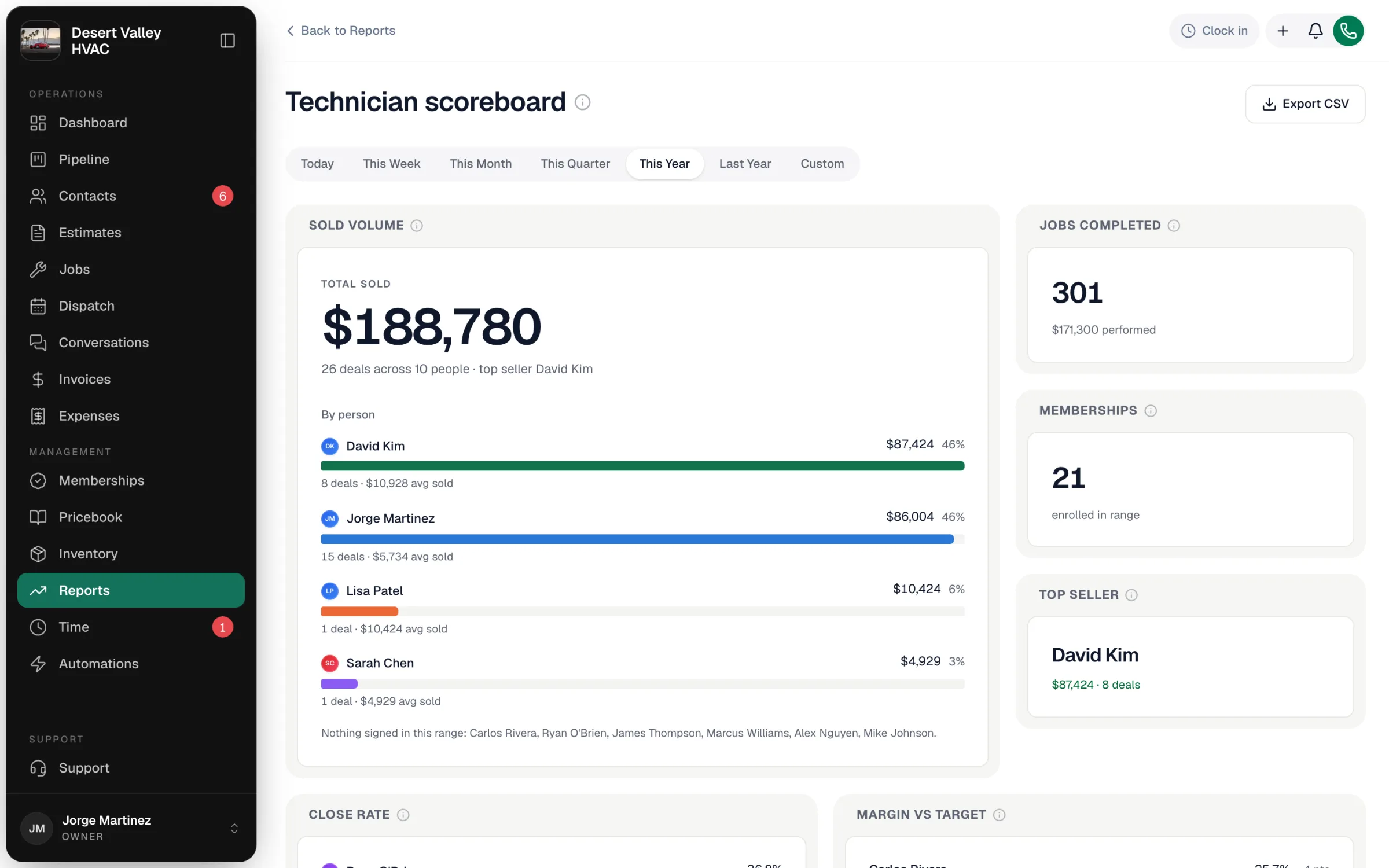
Pick a period
Use the range buttons (Today through Last Year, or Custom). It opens on This Month.
Read the headline tiles
| Tile | What it counts | Credited to |
|---|---|---|
| Sold volume | Estimates approved in the range — the deals and their value, split by person. | The estimate's Sold by person (who got the signature), not a helper who performs the work. |
| Jobs completed | Jobs finished in the range, and the revenue they performed. | The job's assigned tech. |
| Memberships | Memberships enrolled in the range. | The tech who enrolled the customer. |
| Top seller | The highest sold volume in the range. | — |
| Close rate | Of the appointments each tech ran, the share that turned into sold work. | Assigned tech. |
| Margin vs target | Each tech's job margin against the 30% target. | Assigned tech. |
The board includes owners, office staff and people who have since left, as long as they had activity in the range — so its totals tie out with the detail reports.
Use the Leaderboard
Leaderboard is every measure in one table, sorted by sold volume. Click an underlined column header to open its detail report:
| Column | Opens |
|---|---|
| Sold vol., Deals, Avg sold | Sales by Seller |
| Jobs, Avg ticket, Margin, Close | Technician Detail |
| Est. comm. | Commissions — a live estimate under each person's plan; the Commissions report is the payable record |
| Members, Conv. | Membership Conversion |
| Upsell | Upsell beyond the booking fee |
| Leads | Tech Leads |
The detail reports
Technician Detail
Revenue, jobs, close rate, average ticket, punctuality and margin per tech, with its own range buttons. Click a tech to see their jobs.
| Column | How it's worked out |
|---|---|
| Revenue | The invoiced amount on the tech's finished jobs, whether or not the customer has paid yet. |
| Jobs | Jobs the tech finished in the period. |
| Close rate | Of the jobs the tech actually started (en route or further), how many reached Invoiced or Closed. Jobs still sitting in Scheduled after their date, and future jobs, aren't counted. |
| Avg ticket | Invoiced amount ÷ jobs finished. |
| Arrived on time | Share of finished jobs where the tech arrived within 5 minutes of the scheduled start. Jobs without a scheduled window aren't counted. |
| Finished on time | Share of finished jobs where the work took no longer than the scheduled window's length, plus 15 minutes' grace (counted from when the tech actually started). |
| Avg margin | Average profit margin across the tech's finished jobs that have revenue. |
Sales by Seller
Approved-estimate volume credited to the person who sold it, for this year: signed volume, deals, average deal, top seller, and a leaderboard with each seller's last sale. Estimates without a seller show as Unattributed — set Sold by on the estimate to credit someone.
Upsell beyond the booking fee
Of the jobs where your service call fee was charged, how often the tech sold something more, and how much. To use it, open your service call fee item in the pricebook and turn on This is your service call fee. Jobs without that item (installs, for example) aren't counted.
Membership Conversion
For each tech: the non-member customers they serviced in the period (opportunities), how many they enrolled in a membership themselves in the same period, and the conversion rate. A customer the office enrolls later doesn't count toward the tech.
Tech Leads
Opportunities each tech flagged to the estimator from the field app (Flag opportunity on the job screen) — how many they generated, how many the office won, the win rate and the won value. The office works these leads under Contacts → Opportunities.
Export
Export CSV on the scoreboard downloads the whole leaderboard. Each detail report has its own Export CSV too.