Some visits end with the work done but something left for the office: a repair that needs a quote, or a return visit. Quote required and Need to return let a tech say that as they complete the job. The job is completed exactly as if they had tapped Complete Job; the outcome is a note on top that the office sees everywhere the job shows up.
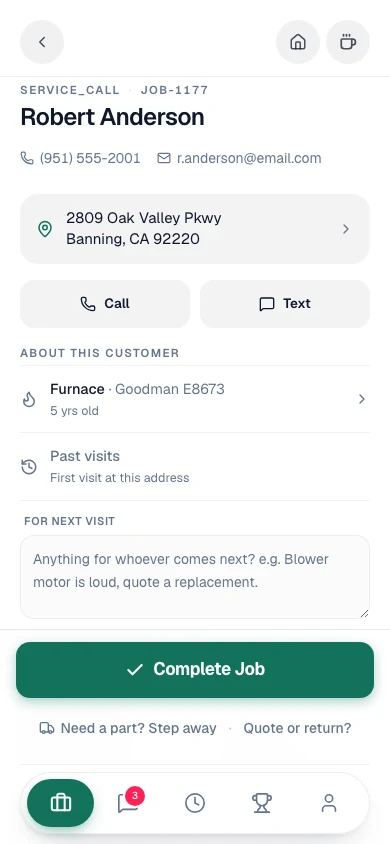
Tap Quote or return?
Open the job. Once you've tapped Arrived on Site, Quote or return? sits under the green Complete Job button, next to Need a part? Step away. On a crew job, it sits under Mark install complete on the final day.
Pick one
Optionally type what the office should know, then tap:
- Complete · quote required when the office needs to build and send a quote from your notes.
- Complete · need to return when another visit is needed to finish.
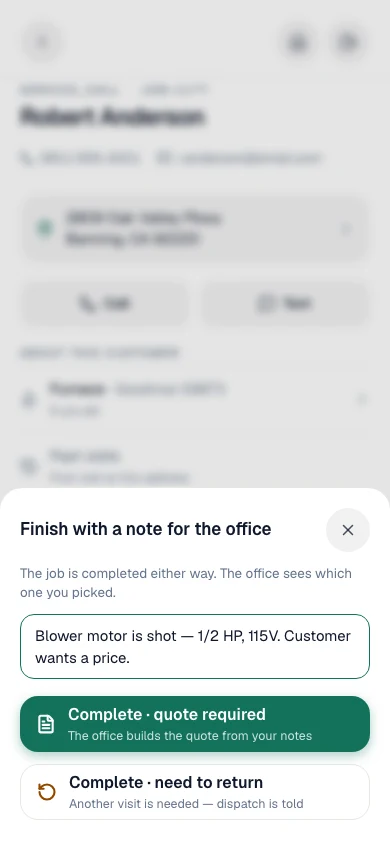
Either one completes the job. The customer gets the same completion text as a plain Complete Job, your job time closes, and the next step on your screen is the invoice, so you can still bill the diagnostic on the spot.
From the office
Everyone in the office gets a notification: Quote required — Lodi USD or Return visit needed — Lodi USD, with the tech's note.
Quote required jobs appear under a Needs quote tile at the top of Jobs (the tile only shows while there is at least one). On the job page, a row under the status reads Quote required · Carlos Rivera with the note, and a Create estimate button that starts the quote from this job. The row clears on its own once an estimate is created from the job.
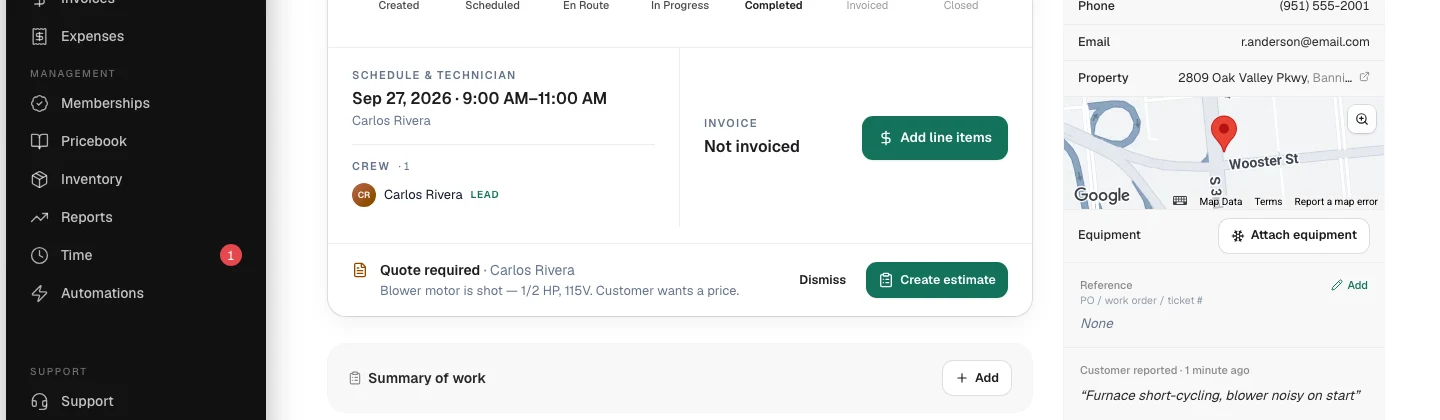
Need to return jobs show Needs a return visit in the same row, with Schedule return visit. That opens the follow-up dialog already set to Return Visit with the tech's note, so the return lands in the unscheduled queue in one step. The row clears once the follow-up exists.
Dismiss clears the row without creating anything, for a quote sent another way or a return that turned out not to be needed.
The dispatch board and the job's hover card show Quote required or Need to return in place of Done.
What it changes, and what it doesn't
| Quote required / Need to return | |
|---|---|
| Job status | Completed, same as Complete Job. |
| Customer texts | The same completion text as Complete Job. |
| Job time and payroll | Your job clock closes, same as Complete Job. |
| Invoicing | Unchanged. Bill the visit as usual. |
| Clearing it | An estimate or follow-up created from the job, Dismiss, or the job being reopened or cancelled. Invoicing the job keeps it. |
Automations can react to it. On a When a job is completed automation, filter on Outcome equals quote_required to text the office or open a task only for those jobs.
Good to know
- Works offline. The outcome is saved with the completion and syncs when you reconnect.
- Multi-day jobs. The choice appears on the final day only. Earlier days end with Wrap day.
- Helpers never complete a job, so they don't see it.
- Integrations see it as
completion_outcomeon the job and on thejob.completedwebhook.