
The option builder gives your customer a few choices on every estimate, from the full fix down to the basic repair. Run a Call builds the options, and your tech checks them before the customer sees anything. It is off until you turn it on.
Who can do this
Owners and admins. Roles that can edit company settings can change these too.
Where to find it
Go to Estimates, click the gear (Estimate settings) and open Option builder.
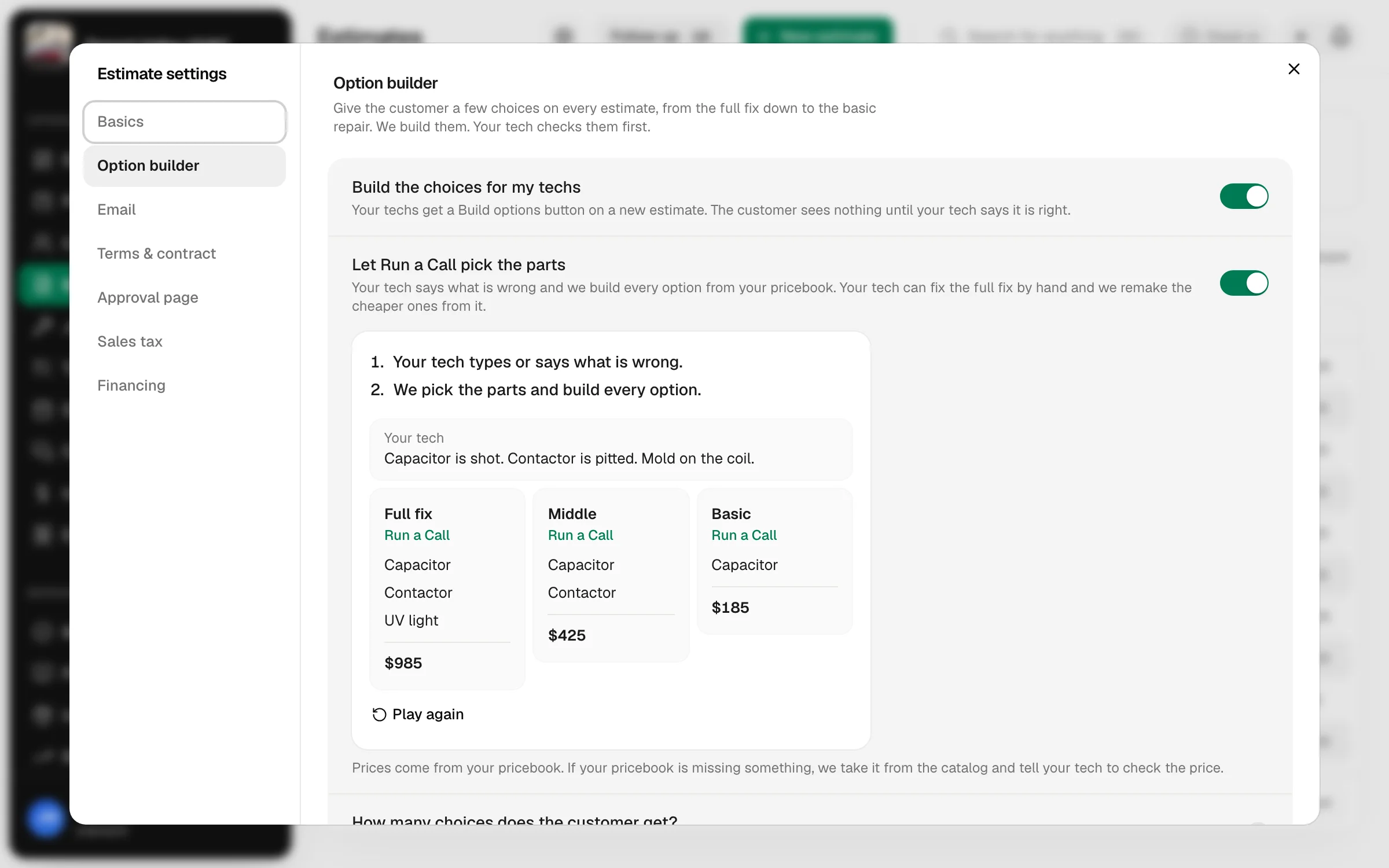
Each setting saves by itself as soon as you change it. The rules box saves when you click out of it.
Turn it on
Switch on Build the choices for my techs. Your team now gets the option builder button on a new estimate, in the office and in the tech app. The other settings show up once this is on.
With it off, nothing changes for your team. They type in every option by hand, like before.
Decide if Run a Call picks the parts
Let Run a Call pick the parts is a second switch. It starts off.
| Switch | How it works | Good for |
|---|---|---|
| Off | Your tech puts the parts on the top option. Run a Call makes the cheaper ones by taking parts off it. It never adds a part or changes a price. | Experienced techs who want to choose the top option themselves. |
| On | Your tech types or says what is wrong. Run a Call picks the items and prices from your pricebook and builds every option. Your tech can still fix the top option by hand and have the cheaper ones remade from it. | Newer techs, and shops that want every estimate built the same way. |
The small picture under the switch plays out the choice you picked, step by step. Click Play again to watch it once more.
With the switch on, if your pricebook is missing an item, Run a Call takes it from the built-in catalog and tags the line From our catalog · check the price. Those lines use the catalog's suggested price, so the fuller your pricebook, the fewer prices your techs have to check.
Set how many choices the customer gets
Pick 3 options, 4 options, 5 options or 6 options under How many choices does the customer get?
A small job may get fewer. There are not always enough different parts to make each option different.
Add your own rules
Things to do on every estimate is where you tell the builder how your shop does it. Type it like you would tell a new tech, one rule per line. For example:
- Every option gets our 2 year labor warranty.
- Never leave the surge protector off a new board.
The box holds 2,000 characters and is optional.
Decide on photo reminders
Switch on Remind techs to add a photo if you want your techs to show their work. When an upgrade has no photo, your tech gets a reminder on the estimate and once more when they save. They can still save without one.
An upgrade here means any item that is not in the cheapest option. See Building options from the tech app.
Good to know
- Your pricebook does the heavy lifting. The builder only uses your items and your prices. Clear item names and descriptions give you better estimates. See Pricebook catalog and starter items.
- Nothing reaches the customer by itself. Built options are a draft on the estimate. Your tech reads them, edits them and sends the estimate.
- There is a monthly limit. Each company gets a set number of builds a month (300 unless we have changed it for you). Contact support if your team needs more.