
There are four ways to get paid by card in Run a Call. The customer can pay online from their invoice link. Your office can take the card over the phone or charge a card you have on file. A technician can take the card in person on a card reader. Each one records the payment on the invoice for you.
| Situation | Use | Who |
|---|---|---|
| The customer pays when it suits them | The pay link on the invoice | The customer |
| The customer reads you their card over the phone | Take payment online on the invoice | Office |
| You already have the customer's card saved | Charge card on file on the invoice | Office |
| The tech is on site and the customer wants to tap or insert | Card on a Stripe Reader M2 | Field tech |
| The card was run on a different machine | Record Payment → Card | Office or field |
The first four need your Stripe account connected. See Enabling online payments with Stripe.
The customer pays online
When you send an invoice, the email includes a Pay Now button. If texting is set up for your account, the first send also texts the customer a pay link. Both open your pay page, where the customer:
- Checks the invoice and the amount due.
- Taps Pay $X. If you add a card fee, the total already includes it, with a note under the button.
- Enters their card, or uses Apple Pay, Google Pay or Link on devices that offer them. If you accept bank payments, they can switch to their bank account instead.
- Taps Pay $X again to confirm.
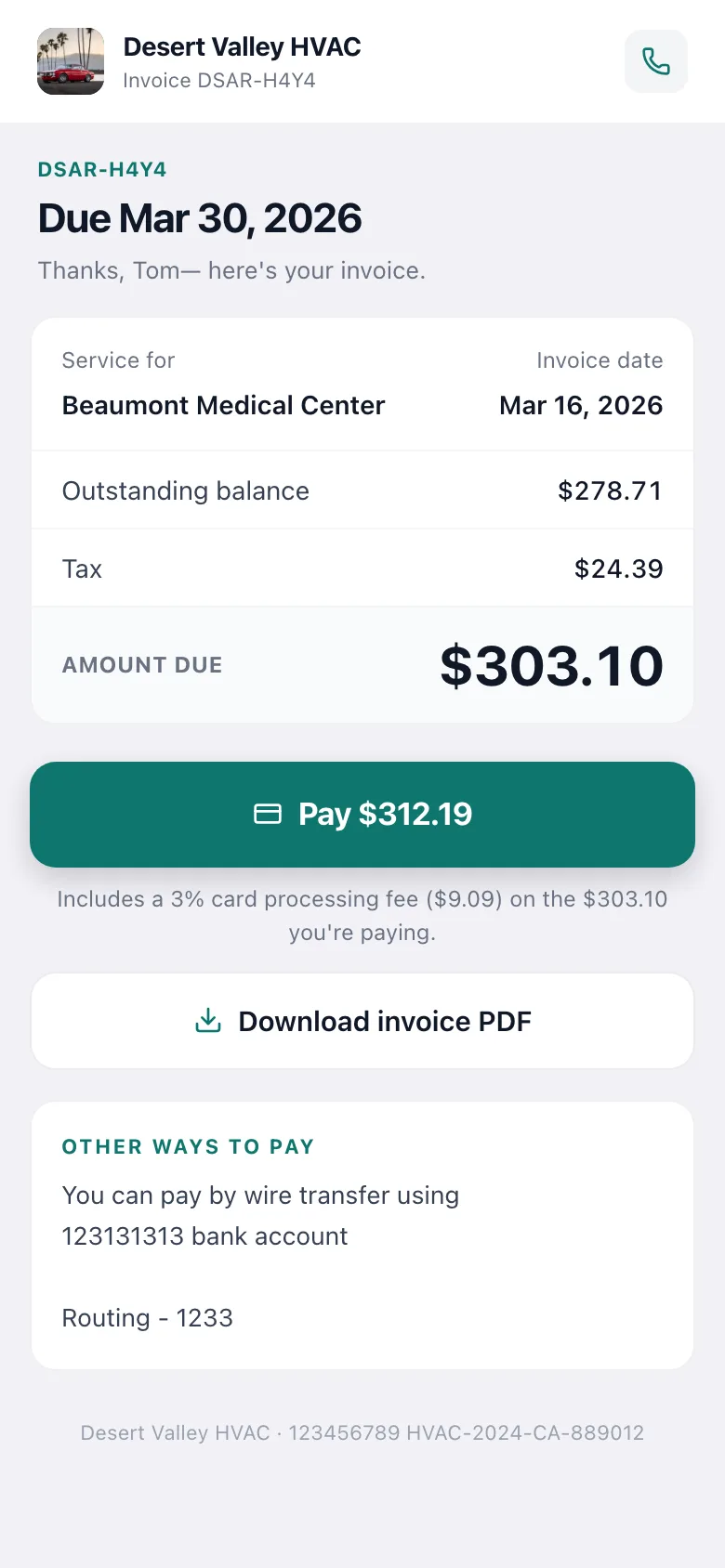
The invoice updates by itself within a few seconds. The customer sees Payment received and gets an emailed receipt. See What customers see when you send an invoice.
Take a card over the phone
- Open the invoice. It must have been sent first. A draft shows "Send the invoice first — it can still be edited, so it can't be paid online yet."
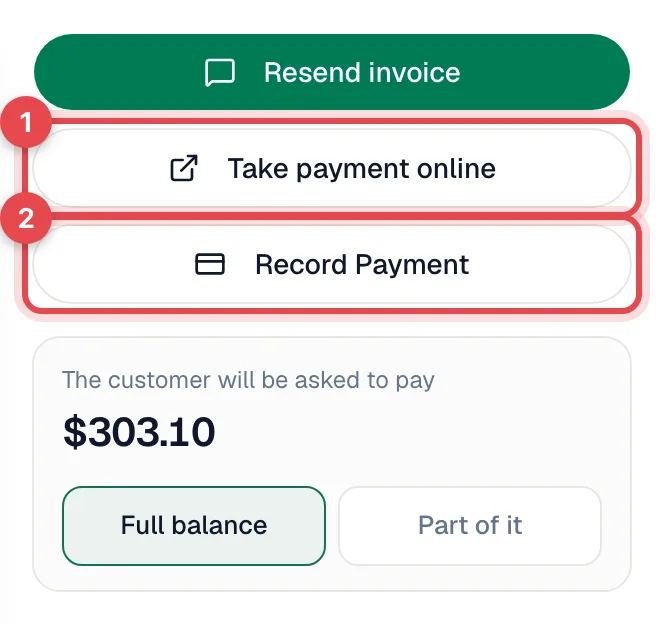
- Click Take payment online. The customer's pay page opens in a new tab.
- Type the card the customer reads to you and complete the payment.
- Switch back to the invoice. It shows Waiting for payment… this updates automatically. and changes to Paid once Stripe confirms.
Want to keep the card for next time? Save it on the customer's Cards on file tab instead, then charge it. See Adding a card on file for a customer.
Charge a card on file
If the customer has a saved card, click Charge card on file on the invoice, check the amount, and confirm Charge $X. The card is charged right away and the invoice updates. Full steps are in Adding a card on file for a customer.
In person, on a card reader
With Tap to Pay set up, a technician opens the invoice in the mobile app and taps Card. The customer taps, inserts or swipes on the Stripe Reader M2 and the invoice marks itself paid. See Taking a payment with Tap to Pay.
Asking for part of the balance
To collect a deposit or an installment instead of the full balance:
- On the invoice, find the card that reads The customer will be asked to pay.
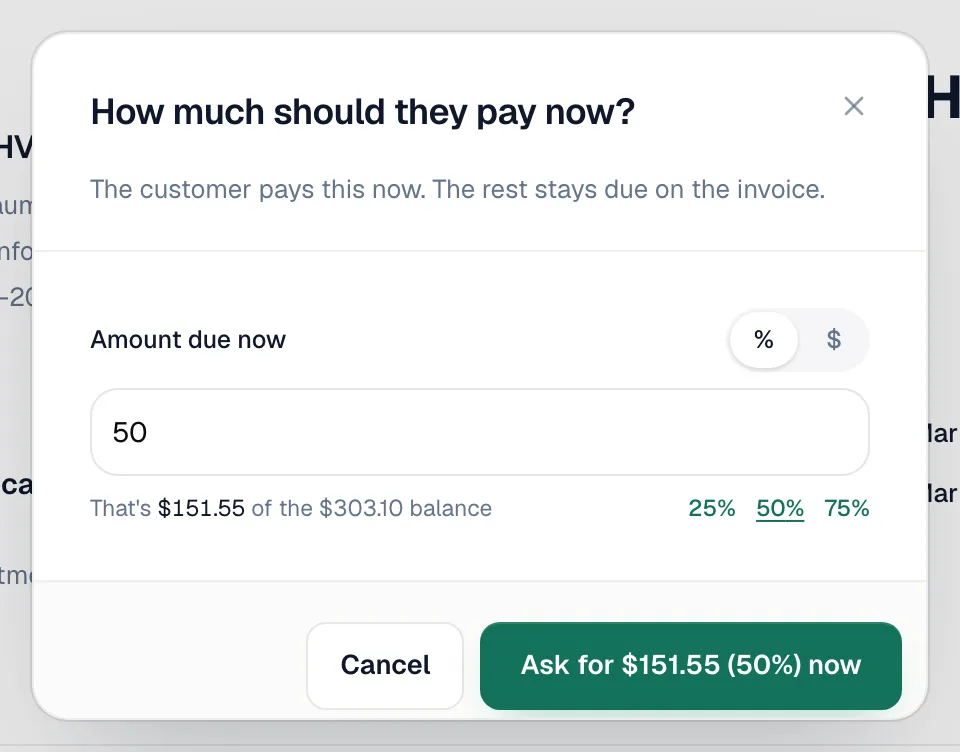
- Click Part of it.
- Enter a dollar amount or a percentage (there are quick 25%, 50% and 75% buttons), then confirm Ask for $X now.
The pay link, the invoice email and the PDF now ask for that amount. The customer can still choose to pay the full balance. Once they've paid the requested amount, the request clears, and Full balance switches the invoice back to the full amount.
To let customers pick their own amount on every invoice, turn on Partial payments under Settings → Integrations → Stripe. See Enabling online payments with Stripe.
Invoices that are part of a payment schedule, and membership renewals, always bill their exact amount.
What happens when a card payment succeeds
| Where | Result |
|---|---|
| Invoice status | Paid, or Partial if part of the balance is still owed. |
| Payment history | The payment is listed on the invoice with the date and amount. The card fee, if any, is shown separately. |
| Customer | Gets an emailed receipt. |
| Job | Closes by itself once its invoice is paid in full and the work is done. |
| QuickBooks | The payment syncs if QuickBooks is connected. See How payments sync to QuickBooks Online. |
If a card is declined
- Online: the customer sees the bank's message on the pay page and can try another card. Nothing is recorded on the invoice.
- Card on file: the charge window shows the reason and Nothing was charged.
- Reader: the phone shows Payment not completed with the reason, and a Try again button.
Cards run somewhere else
If the customer paid on a card machine that isn't connected to Run a Call, record the payment by hand. Open the invoice, click Record Payment, pick Card, enter the amount and, optionally, the transaction number from the receipt. No card details are stored. See Collecting cash and other offline payments.
Good to know
- Refunds are issued in your Stripe Dashboard, not in Run a Call.
- Card fees are set once, under Settings → Integrations → Stripe → Online payment fees. The same fee applies online, on saved cards and on the reader.
- Turning cards off for one customer: an owner can add them under Card payments by customer. Their pay page then shows your other payment instructions instead of a Pay button.