
Five built-in emails keep members informed about late renewals, pauses, price changes and win-back offers. Each has its own switch in the Memberships folder on the Automations page. They're emails, so they work without business texting.
The five membership emails
| On the Automations page | When it sends |
|---|---|
| Email members when a payment is late | The renewal invoice is 14 days overdue |
| Email members before their membership pauses | 30 days overdue: warns that the membership pauses in 24 hours |
| Email members when their membership pauses | The membership is paused for non-payment |
| Email members before a price change | An owner schedules a price change on the member's plan |
| Email members who haven't booked in a while | Someone on your team sends the win-back email from the memberships worklist |
Turn them on
- Open Automations from the sidebar.
- Open the Memberships folder.
- Flip on the emails you want. Each one is independent.
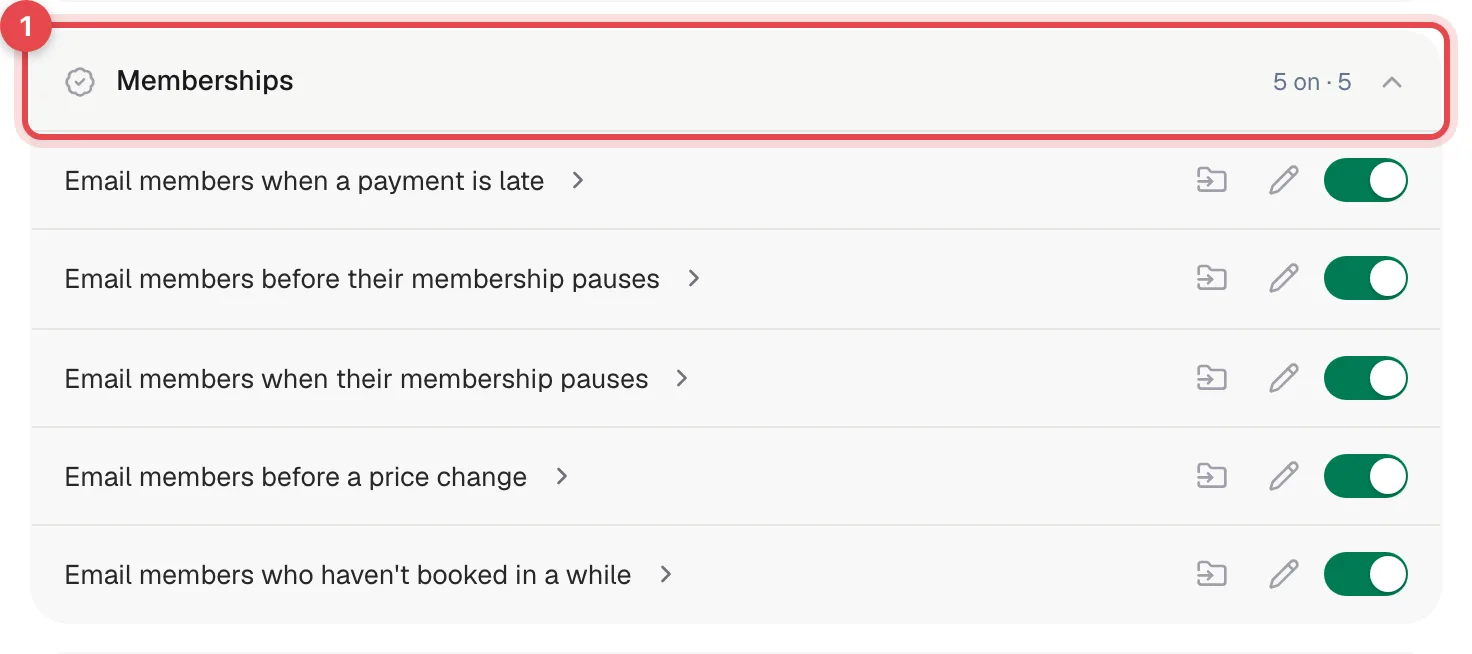
Click an email's name to see when it sends and who gets it. The wording of these five emails is fixed: they always go out with Run a Call's standard text, even if you edit them in the builder.
Before a renewal is due
Renewal invoices are prepared for you, but they aren't emailed to members automatically.
| When | What happens |
|---|---|
| 14 days before the billing date (change it with Send renewal invoice this many days early under Settings → Memberships) | Run a Call creates the renewal invoice as a Draft. |
| Same morning, member has autopay on with a saved card | The card is charged and the invoice is marked paid. If the charge fails, the card is flagged and the invoice follows the late-renewal timeline below. |
| Same morning, your team | Everyone on your team, technicians included, gets a bell notification: Renewal invoices ready to collect, linking to Memberships. |
Send or collect the draft invoices yourself from the invoice or the Memberships page. With Automatically email renewal invoices switched off under Settings → Memberships, no renewal invoices are created at all.
Despite their wording, Automatically email renewal invoices and Send renewal invoice this many days early don't email anything: they control whether, and how early, the draft renewal invoice is created.
How the late-renewal timeline works
Every morning Run a Call checks active memberships whose latest renewal invoice is unpaid. Days overdue are counted from the end of your grace period, set under Settings → Memberships in Grace period before a renewal counts as overdue (7 days unless you change it).
| Days overdue | What happens |
|---|---|
| 7 | A short text reminder, if business texting is set up (this one isn't a switch on the Automations page) |
| 14 | Email members when a payment is late, with a link to the invoice |
| 30 | Email members before their membership pauses |
| After 30 | The membership is paused and Email members when their membership pauses goes out. To wait longer before pausing, raise Auto-pause membership after this many days overdue under Settings → Memberships (30 unless you change it). The pause never comes before the 30-day warning email. |
What the member receives, for example on pausing: the subject Gold Maintenance Plan membership — now paused, a note that visits and member discounts resume once the renewal is paid, and a Reactivate membership button.
The timeline moves one step at a time. If Email members when a payment is late or Email members before their membership pauses is off, the timeline waits at that step, so the membership isn't paused automatically until you turn that email back on. Email members when their membership pauses only controls the notice; with it off, the membership still pauses, silently. A member with no email address on file also stays at the 30-day step and isn't paused automatically.
Once the member pays, the countdown resets. If they fall behind on a later renewal, the timeline starts again from the beginning.
Price change notices
When an owner schedules a price change on a membership plan, every member on that plan with an email address gets a notice with the old price, the new price and the date it takes effect. The notice goes out when the change is scheduled. With Email members before a price change off, no notice is sent.
Win-back emails
On the Memberships page, the Win-back list shows members who haven't had a covered visit in 18 months or more. Next to members with an email address there's a button to send a we-miss-you email; it asks you to confirm with Send email. If Email members who haven't booked in a while is off, the email isn't sent and you'll see a message saying it's turned off.
Where to check what went out
- Automations → Runs: every membership email, with the recipient, subject and message. See Viewing automation runs and step timelines.
Monday tune-up summary
Every Monday at 8:00 AM Eastern time, owners, admins and staff get a bell notification such as 3 membership tune-ups due this week, naming the members whose next maintenance visit falls in the next 7 days. Weeks with nothing due are skipped. It isn't an email and it isn't a switch on the Automations page.
Good to know
- Imported memberships are left alone. Memberships brought over from your previous software don't get late-payment emails or get paused by this timeline.
- Turning an email back on picks up where the member left off: the next morning's check sends the step they're waiting on. A member who already got the 14-day email won't get it again.
- Different timing (for example a reminder 3 days after the due date) isn't possible on these built-in emails, and there's no separate reminder builder for memberships. You can adjust the grace period, which shifts the whole timeline, or build your own automation with the membership triggers. See Automation triggers catalog.