
These are the ready-made messages that come with every Run a Call account. Each one has its own switch on the Automations page, and each one starts off, so nothing goes out until you choose to turn it on.
The names below are the ones you see on the Automations page.
Emails (work right away)
Emails need no add-on and no registration. Turn one on and it starts with the next matching event.
| On the Automations page | When it sends | Who gets it |
|---|---|---|
| Email a reminder before each appointment | The day before a scheduled appointment | The customer |
| Email a receipt after the customer pays | When a payment is recorded: entered by your team, paid by card, or paid through the customer's pay link | The customer |
| Email you when a customer approves an estimate | When a customer approves an estimate from their approval link | Your business email address |
| Email the customer a visit report when the job's done | When the tech marks the job complete. The report is a PDF with the work performed, tech notes and photos. | The customer |
| Email a reminder when an invoice is past due | At 7, 14 and 30 days past due, one email at each step, with the invoice PDF attached and a pay link. Runs beside the overdue text, with or without texting. See Overdue invoice reminders. | The customer |
| Email customers when their air filter is due | A week before each of a unit's filter change dates, every cycle; once per due date. Only for units with a filter schedule on the equipment record. See Filter change reminders. | The customer |
| Email a confirmation when an online booking is confirmed | When an online booking request becomes a scheduled job: you click Confirm booking in the Bookings inbox, or it books itself because Book instantly is on. It has the day, arrival window and service address. See Handling online booking requests. | The customer |
| Email members before their maintenance visit | A set number of days (7 by default) before a member's booked maintenance visit, with a Pick a new time button. See Maintenance visit reminders. | The member |
| Email customers before their estimate expires | A set number of days (3 by default) before an open estimate's Valid until date, once per estimate, with a Review & Approve button. See Understanding estimate statuses. | The customer |
Folders: the appointment reminder, the air filter reminder, the booking confirmation and the maintenance visit reminder start in Scheduling; the others start in Getting paid.
The estimate and invoice emails themselves aren't on this page on purpose. They go out when you press Send on the estimate or invoice, so they can never be switched off by accident.
Membership emails
These start in the Memberships folder. Each one is its own switch, so you can keep some and skip others. Details: Membership renewal and dunning emails.
| On the Automations page | When it sends |
|---|---|
| Email members when a payment is late | A membership renewal invoice is 14 days overdue |
| Email members before their membership pauses | 30 days overdue: warns the member the membership pauses in 24 hours |
| Email members when their membership pauses | The membership is paused for non-payment |
| Email members before a price change | An owner schedules a price change on the member's plan |
| Email members who haven't booked in a while | Someone on your team sends the "we miss you" nudge from the memberships worklist |
Customer texts (need business texting)
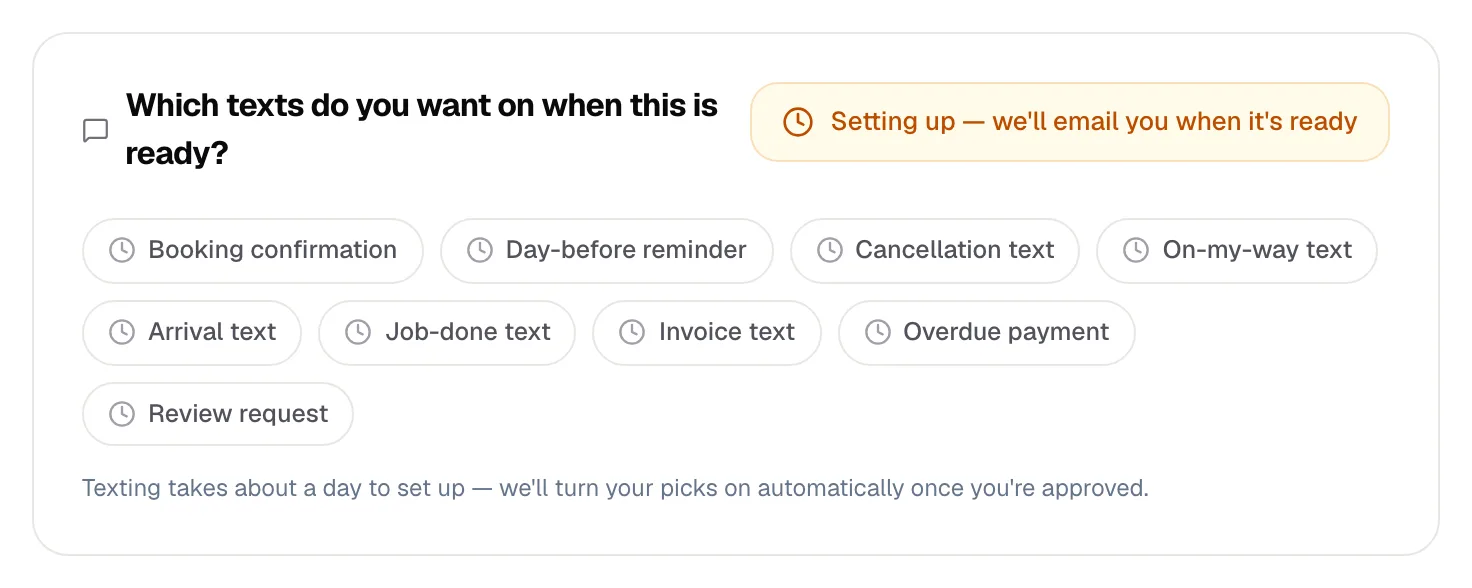
Texts only send once business texting is active on your account and your texting registration is approved. Until then they don't appear as switches; instead you see the business texting card on the Automations page. See Enabling SMS-based automations.
Once texting is live they appear in the Texting folder:
| On the Automations page | When it sends |
|---|---|
| Text a booking confirmation | A job is scheduled, including when an online booking is confirmed |
| Text a reminder the day before | The day before the appointment |
| Text the customer when a job is cancelled | A scheduled job is cancelled |
| Text the customer when the tech is on the way | The tech taps On My Way in the mobile app |
| Text the customer when the tech arrives | The tech arrives on site |
| Text the customer when the job's done | The job is completed |
| Text the invoice link | You send an invoice. The text includes a pay link when online payments are set up. |
| Text a reminder when payment is overdue | An invoice is 7, 14 and 30 days past due, one text at each. See Overdue invoice reminders. |
| Text a review request after the job | After a job is completed. Needs your Google review link (below). |
| Text members before their maintenance visit | A set number of days (7 by default) before a member's booked maintenance visit, with a link to pick a new time. See Maintenance visit reminders. |
| Text customers before their estimate expires | A set number of days (3 by default) before an open estimate's Valid until date, once per estimate, with the link to approve it. |
The review request needs your Google review link
The review request text is locked until your business has a review link, because otherwise the text would have nowhere to send customers. Add it in Settings → Reviews, in the Google review link card. Until then the row shows Needs your Google review link with an Add Google review link → shortcut.
The link in the text is tracked, and one reminder goes out after 48 hours if it isn't opened. Every invite and its outcome is listed under Reviews → Invites — see Google reviews: connect, reply, and ask for them.
See what a message does
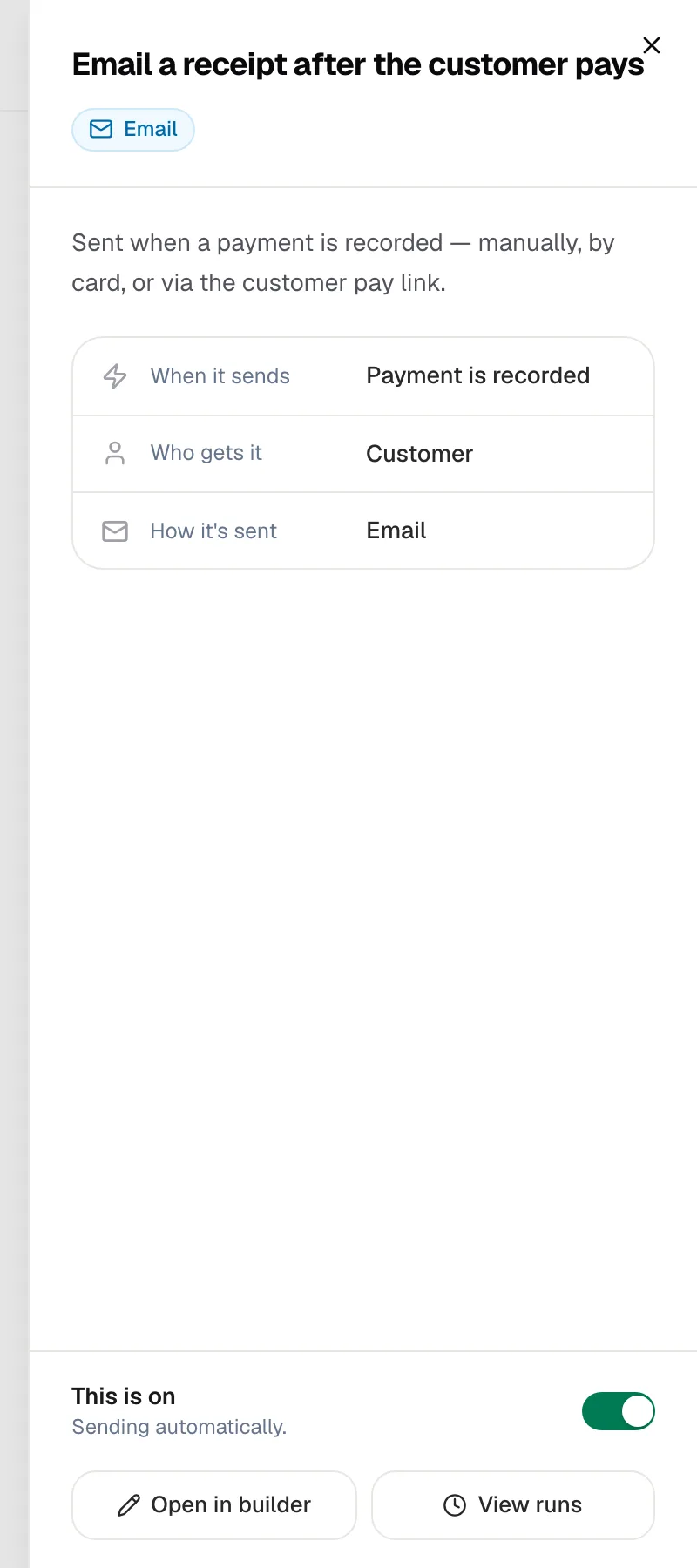
Click the name of any message on the Automations page. A panel opens showing:
- When it sends
- Who gets it
- How it's sent (email or text message)
- Whether it's on, with a switch, plus Open in builder and View runs
What you can and can't change
| You can | You can't |
|---|---|
| Turn each message on or off | Delete a built-in message |
| Change the wording of the appointment reminder, receipt, visit report and filter reminder emails (subject and body), the booking confirmation, maintenance visit reminder and estimate expiring emails (subject and opening line), the overdue invoice email (subject and reminder message) and every customer text. See Changing the wording of a built-in message. | Change what starts it or when it fires (for example the 7 / 14 / 30 day overdue schedule; the exceptions are how many days ahead the maintenance visit reminder and the estimate expiring notice go out), or the wording of the membership and estimate-approval emails |
| Move it into any folder | Rename it |
For a different timing or anything else these don't cover, build your own: Building a custom automation.
Good to know
- Imported history is left alone. Invoices, jobs and memberships brought over from your previous software don't trigger overdue, review or membership reminders.
- Customers aren't flooded. Automated texts and emails to the same customer are spaced at least 25 minutes apart.
- Per-job opt-out. If customer notifications are turned off on a job, that job's scheduling messages are skipped.
- Turning a message off and back on picks up where it left off. For example, an invoice that already got its 7-day text won't get it again.