
The Job Volume report shows how much work you're taking on: jobs created in a period, broken down by where they are in their life, what kind of work they are, or how urgent they were — plus how each kind of work (division) performed.
Open it from Reports → Team & jobs → Job Volume. Owners and admins can see it.
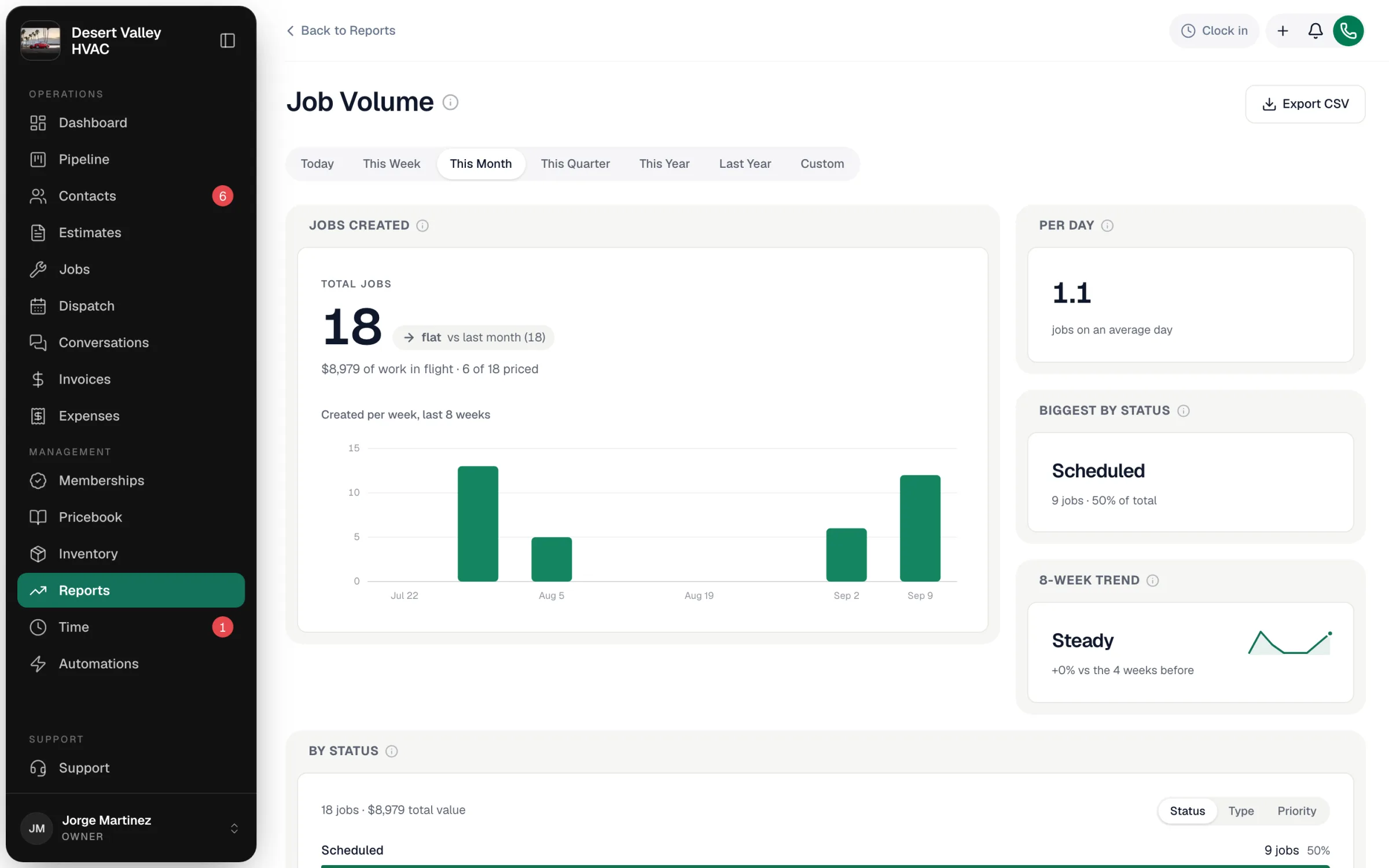
Which jobs are counted
Every job created in the range you pick (Today through Last Year, or Custom) — from a freshly booked work order to one completed and closed in the same window — whatever its status is today, including cancelled jobs.
The tiles
| Tile | What it shows |
|---|---|
| Jobs created | Total jobs, compared with the same length of time before. The line under it shows the value of that work and how many of the jobs are priced. Chart: jobs created per week over the last 8 weeks. |
| Per day | Total jobs ÷ days in the range, so a short week and a long month compare fairly. |
| Biggest by status / type / priority | The largest group in the breakdown below — it follows the toggle. |
| 8-week trend | Weekly job intake over the last 8 weeks, comparing the latest 4 weeks with the 4 before (whatever range you picked). |
| By status / By type / By priority | Use the Status, Type and Priority toggle to split the jobs. Each group shows its job count, share and value. |
| By division | How each job type performed — see below. |
Value under a group is the job's invoice amount once it's invoiced (voided invoices don't count), or the job's line-item total before that.
Statuses are Created, Scheduled, En Route, In Progress, Completed, Invoiced, Closed, Follow-Up, Cancelled and No Show. Priorities are Emergency, Urgent and Normal. Types are your job types (Service, Maintenance, Installation, and any you've added).
By division
Each job type is treated as a division — the same way QuickBooks class tracking sees it.
| Column | How it's worked out |
|---|---|
| Jobs finished | Jobs of that type completed in the range (Completed, Invoiced or Closed). |
| Revenue | The line-item value of those finished jobs. |
| Avg ticket | Revenue ÷ jobs finished. |
| Close rate | Of the jobs scheduled in the range that a tech actually started (en route or further), the share that reached Invoiced or Closed. Jobs still sitting in Scheduled after their date aren't counted. |
| Callbacks | Callback jobs created in the range, charged to the original job's type (a callback on an install counts against Installation), as a share of jobs finished. |
Export
Export CSV downloads the totals, each breakdown (status, type, priority) and the division table.
Good to know
- Cancellation rate: switch the toggle to Status and compare Cancelled with the total.
- Stuck work: a large Scheduled or Completed group in an older range often means jobs that were never moved forward or invoiced.
- This report counts jobs. For dollars collected see Cash Collected; for margins see Job Profitability.