
Quick answers to the invoice questions we hear most. If yours isn't here, email admin@runacall.com.
Can I edit an invoice after sending it?
Yes, as long as it isn't paid or voided. Click Edit on the invoice and confirm Yes, make changes. Owners and admins can change items, prices and tax. Other roles can change notes and terms. The customer's pay link updates right away. When you click Done editing, you're offered Resend invoice so they get the new version by email.
Can I edit a paid invoice?
No. A fully paid invoice is locked, and it can't be voided either. If a cash or check payment was recorded by mistake, an owner or admin can remove it from Payment History, which reopens the invoice.
Can I delete an invoice?
No. Void it instead, which cancels it but keeps the record. See Voiding and deleting invoices.
I sent the invoice to the wrong customer. What now?
Void it, then create the invoice from the correct job. If it just went to the wrong email address, click Resend invoice and enter the right one.
Can I email an invoice to more than one address?
Yes. In the send window, add up to five addresses under To, for example the homeowner and their property manager. Everyone sees each other on the To line.
Can I create an invoice without a job?
No. Invoices are created from a job, from a payment schedule milestone, or by membership billing. For a quick one-off charge, create a job for it first.
Can I send reminders?
The Overdue invoice SMS automation texts customers at 7, 14 and 30 days past due. See Overdue invoice reminders. There's no separate reminder button; click Resend invoice to email the invoice again at any time.
Can I send a batch of invoices at once?
Yes. On the Invoices page, click Send invoices, tick up to 20 invoices, and click Review & send.
Can the customer pay only part of the invoice?
Yes, in two ways:
- You ask for an amount. On the invoice, click Part of it to request a deposit or installment.
- The customer chooses. Turn on Partial payments under Settings → Integrations → Stripe to let customers enter their own amount, above a minimum you set.
Customers can also pay a balance in several goes, with different cards or methods. See Charging credit cards.
One check covers several invoices. How do I record it?
Open the customer, go to the Invoices tab, and click Record one payment for all. See Collecting cash and other offline payments.
How do I change the invoice number format?
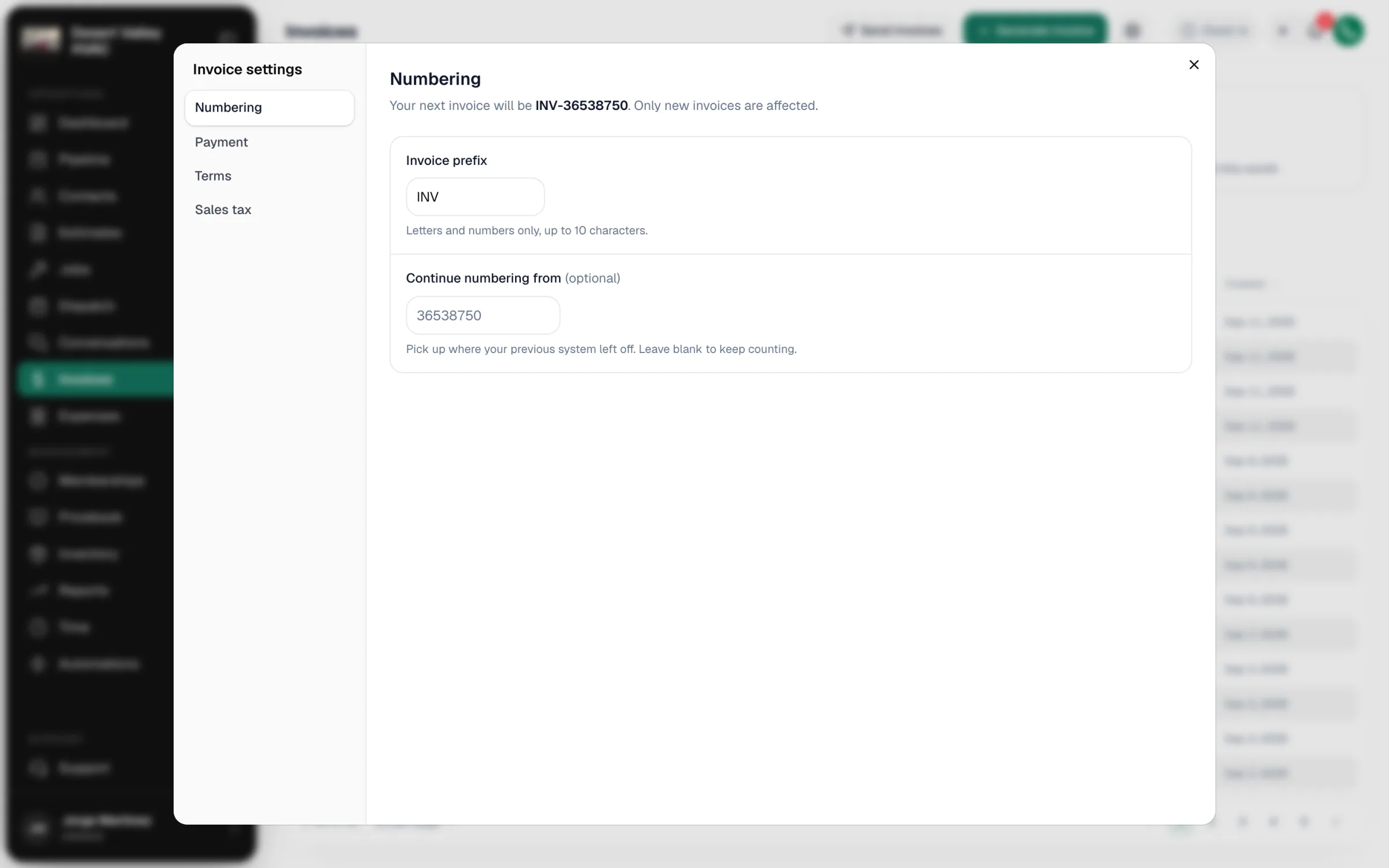
Click the gear icon on the Invoices page and open Numbering. Set an Invoice prefix (letters and numbers, up to 10 characters) and, optionally, Continue numbering from to pick up where your old system left off. This only affects new invoices. You can also change a single draft's number by clicking it at the top of the invoice.
Why doesn't my invoice show my logo?
The invoice, PDF and pay page use the logo from your business settings. See Uploading your company logo.
Why is the tax different from what I expected?
Tax is worked out line by line. Check:
| Where | What to look for |
|---|---|
| The customer | If the customer is marked Tax exempt, no tax is charged. This overrides everything else. |
| Each line's ⋯ menu | Whether the line is marked taxable (Mark taxable / Mark not taxable). Taxable lines show a small T. |
| Your tax rates | A rate that matches the customer's ZIP code or state is used before your base rate. Manage rates from the gear icon on the Invoices page → Sales tax → Manage rates. |
Can I issue a refund or a credit memo?
Not from Run a Call. Refund card and bank payments in your Stripe Dashboard. When one payment is spread across invoices and some is left over, the leftover stays on the customer as unapplied credit.
What if a customer disputes a card charge with their bank?
Disputes (chargebacks) are handled in your Stripe Dashboard, and Stripe notifies you there. Run a Call doesn't show disputes on the invoice, so respond in Stripe before its deadline.
Does the receipt show the line items?
The pay page stays available after payment as a receipt. It shows every line item, the payment history and Download invoice PDF. When you send a paid invoice, the customer also gets a receipt email with a receipt PDF showing the amount paid and the payment method.