
Run a Call Phone gives your shop a business phone line inside Run a Call: calls ring on your office computers, every call is recorded and transcribed, texts live in the same place as calls, and the AI receptionist can pick up when your team can't. You don't need a separate phone provider.
The three products
Phone comes as three add-ons. Take any one, or combine them. Voice and Texting share the same business number.
| Product | What you get | Price |
|---|---|---|
| Voice | A business number, calls in the browser, call recording, transcripts, voicemail, call flows (menus, business hours, on-call), click-to-dial. Includes 2,000 talk minutes a month. | $79/mo, then $0.03 per minute past 2,000 |
| Texting | Two-way texts with customers on your business number, automated reminders, carrier registration handled for you. Includes 2,000 texts a month. | $39/mo, then $0.03 per text past 2,000 |
| Voice + Texting | Both of the above on one number. | $99/mo together |
| AI Receptionist | An AI that answers calls 24/7, captures the job details, screens spam and can transfer to a person. Includes 100 answered calls a month. | $99/mo (free during your trial). Past 100 calls it stops answering unless you allow extra calls at $0.75 each |
Extra phone numbers (for example, a tracking number for a Google or Yelp ad) are $2.50/month each and share the same 2,000 minutes and 2,000 texts.
Turning it on
Owners and admins can turn Phone on from the sidebar:
- Click Conversations. If your shop doesn't have Phone yet, you'll see Let's get your calls handled.
- Pick AI Receptionist or Calling & texting.
- Choose Voice, Texting or both, confirm the total, and add a card if there isn't one on file.
- For Voice, pick your business number, enter the emergency (E911) address, and acknowledge the 911 limits.
See Getting a new phone number for the number steps and Setting up the AI Receptionist for the receptionist.
Want to keep the number your customers already know? Ask us to move it for you. See Bringing your existing number to Run a Call.
Where everything lives
Conversations (sidebar) is the day-to-day inbox. It has three views at the top:
| View | What's in it |
|---|---|
| Calls | Every call in and out: missed, voicemail, answered, with recordings and transcripts. |
| Messages | Text threads with customers, plus internal team chat. |
| AI | Calls the AI receptionist handled, with what it captured and what still needs doing. |
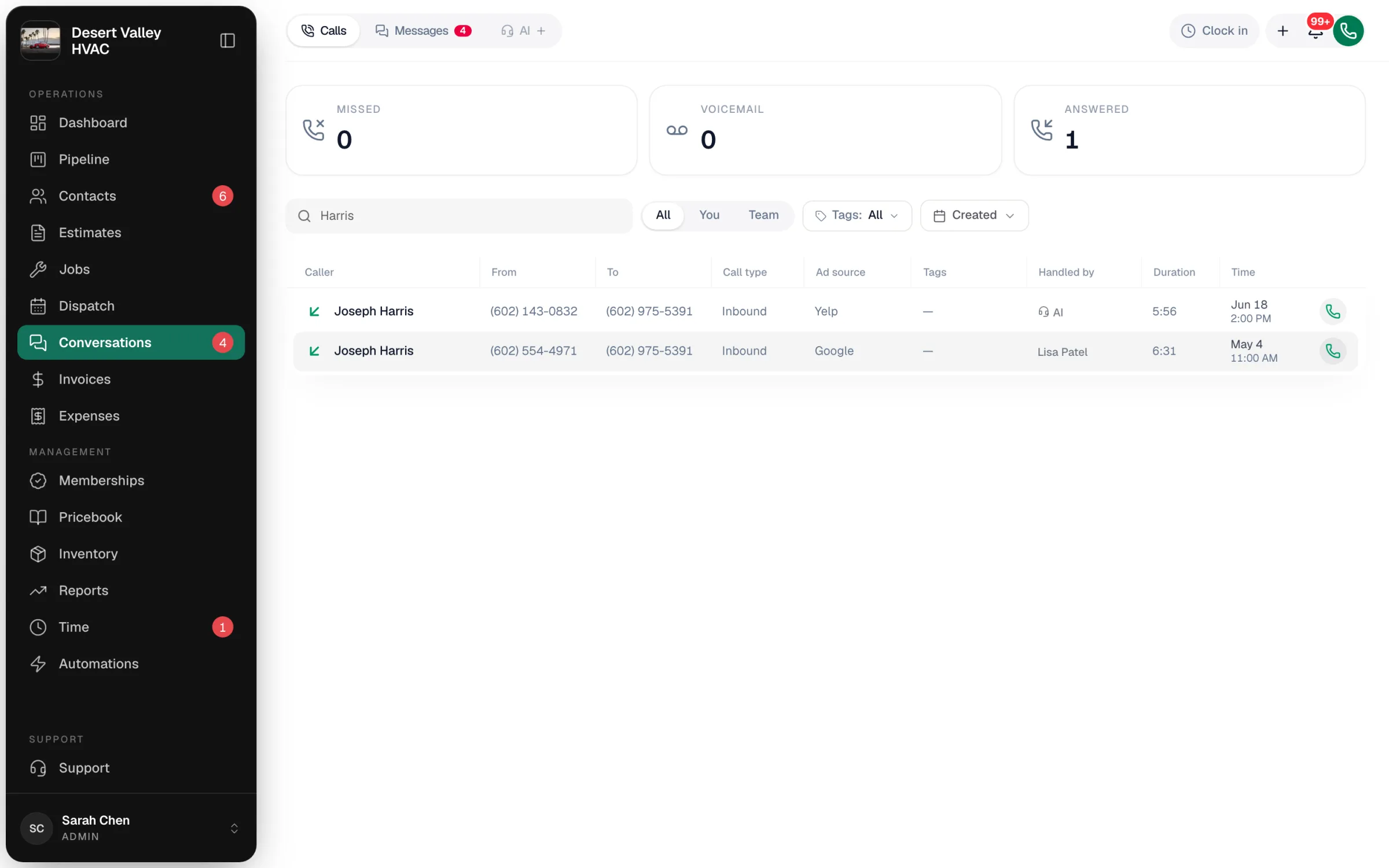
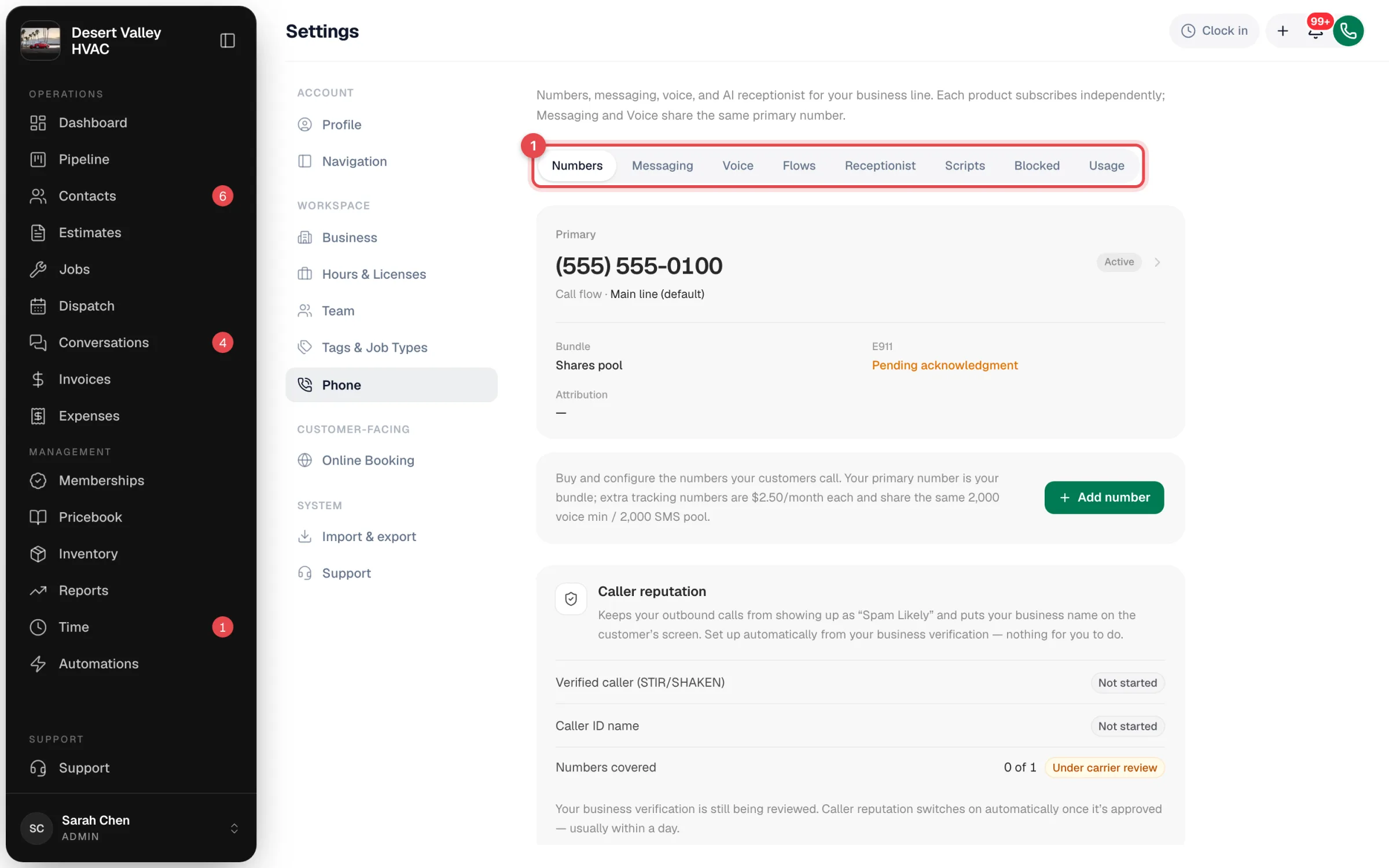
Settings → Phone is where owners and admins set things up. It has one tab per area:
| Tab | What you do there |
|---|---|
| Numbers | See your numbers, buy another one, check E911 and recording per number, caller reputation. |
| Messaging | Check the carrier registration status for texting. |
| Voice | Dial pad look, your ringtone, your missed-call and voicemail alerts, simple call routing, transcription, recording retention. |
| Flows | Build call flows: menus, business hours, who rings, voicemail boxes. |
| Receptionist | The AI receptionist's voice, name, greeting, FAQ and transfers. |
| Scripts | Intake questions your team asks on inbound calls. |
| Blocked | Numbers that are never allowed to reach you. |
| Usage | Minutes, texts and AI receptionist calls used this period. |
Who can do what
| Task | Who |
|---|---|
| Buy numbers, change routing, flows, recording, call scripts and receptionist settings | Owners and admins |
| Answer and make calls, use Conversations, run call scripts, block a number | Office roles with access to Conversations (owner, admin, staff) |
| Call customers from a job in the mobile app | Field techs, from their assigned jobs |
Good to know
- Calls ring on computers. The incoming-call popup and the in-app dialer run in a web browser on a desktop or laptop. On phones and tablets, the office inbox still works and techs can call customers from their jobs.
- Usage resets every billing period. See live counts on Settings → Phone → Usage.
- Caller reputation on the Numbers tab registers your business so your outbound calls show your name and aren't labelled "Spam Likely". It's set up automatically once your business verification is approved.